The worst retail video problem I keep seeing isn’t bad creative. It’s a store manager asking for a local version of a campaign, and the central team having nothing but the same generic file for every location. That’s how multi-location retail gets stuck broadcasting one message into a hundred different markets and wondering why the results feel flat.
Retail video marketing automation fixes that gap by treating store data as the starting point, not the afterthought. HubSpot reports that 91% of businesses use video as a marketing tool and 41% of marketers spent money on video ads in 2025, up from 2024, which tells you the format is already mainstream HubSpot marketing statistics. The problem is no longer whether to use visual content. The problem is whether your team can make it local without building a production crew for every region.
The Store Manager Who Wanted Her Own Video
She didn’t ask for anything fancy. She wanted the weekend offer to show her store name, the right product line, and the local incentive her district had approved. The corporate team had already built the master asset, so the answer was the same one she’d heard all quarter, use the generic version and “keep it consistent.”
That answer is expensive. Not in production cost alone, but in the slow erosion of relevance that happens when a store in Phoenix gets the same recorded message as a store in Portland, even though the inventory, weather, and shopper behavior are different. Retail teams feel this every time they push a single promo to every location and then try to explain why store managers aren’t excited to share it.
Practical rule: if a campaign can only work when every store is identical, it’s already too blunt for retail.
A chain with 200 stores doesn’t need more one-off creative. It needs a system that can render the same core idea into store-specific output, fast enough to matter inside the promotion window. That’s the actual bottleneck, not the concept of video itself.
The internal team at Tribes brought production in-house and increased productivity by 21x, which is a useful reminder that distribution speed changes once the video process stops depending on outside bottlenecks how Tribes brought video marketing in-house. Retail has the same issue, just with more locations and more moving parts.
What Retail Video Marketing Automation Actually Means

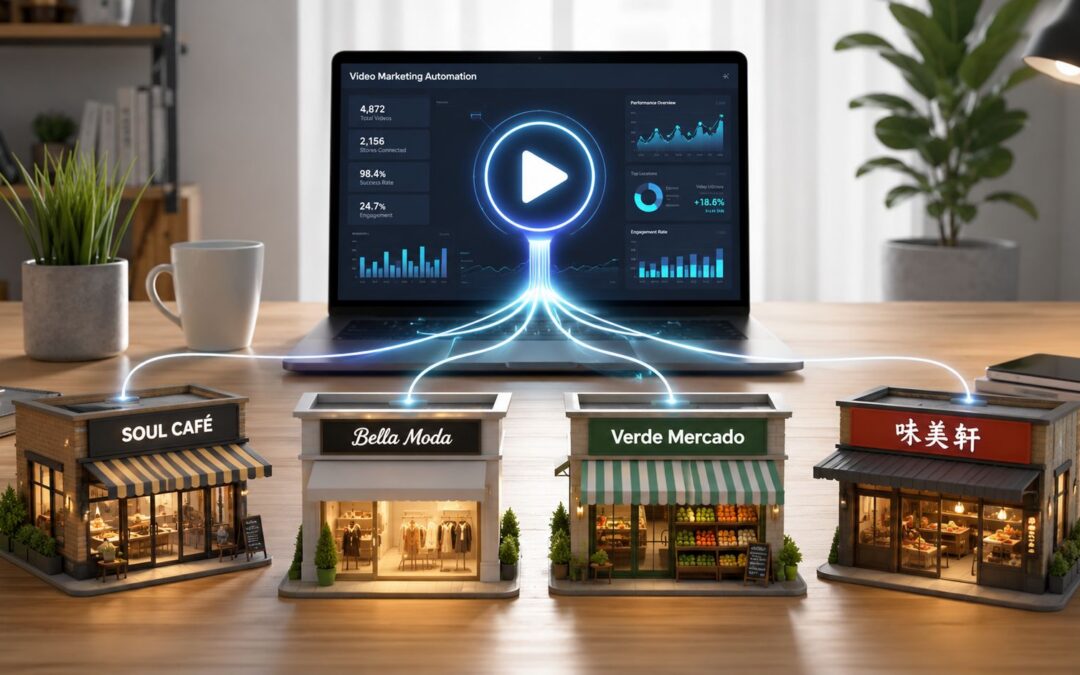
Retail video marketing automation is a data-to-template system. A single template holds the layout, branding, pacing, and call to action, while store-level data fills the variable fields, such as location name, inventory, price, offer, loyalty segment, or regional message. The result is not one polished file. It’s hundreds of store-specific dynamic assets rendered from one master structure.
That distinction matters. Templating without data is just a design shortcut. Automation without a template is chaos. The winning model is a programmed workflow that pulls business data into a repeatable format, then sends the right version to the right store or audience.
If you’re comparing tools, a useful starting point is a practical guide like find the best AI marketing tools, but retail teams should be picky. The tool has to respect store-level differences, not flatten them into one polished, unusable asset.
Direct advice: don’t ask, “Can this make videos faster?” Ask, “Can this render the right store variant when pricing or inventory changes?”
That’s why the difference between manual production and hands-off workflows is so large. Manual teams spend their time revising filenames, swapping logos, and waiting on approvals. A systematic workflow uses the same template, the same rules, and the same source data, then produces a repeatable result across regions without multiplying headcount.
For a deeper product view, Wideo’s personalized video workflow shows the logic clearly, connect the data, set the variables, and render the version that fits the audience. That’s the right mental model for retail, ecommerce, travel, or finance. The content changes by store or segment, the system stays the same.
One Video to Every Store vs One Template to Every Store
A finished video sent to every store is simple, but it’s also blunt. If the price changes in one region, someone has to rebuild the asset or accept that the message is wrong for half the network. That’s a bad trade when the promotion window is short and local managers need something usable now.
A single template rendered per store is harder to set up once, then easier to live with every week after that. The creative team stops acting like a repair shop and starts acting like a system owner. The data quality risk shifts upward, which is exactly where it belongs. If inventory, pricing, or segment data is messy, you’ll see it immediately in the rendered output.
Opttab geo automation is a useful reference point for teams thinking about location-triggered actions, because retail video works the same way at a message level. The local rule matters more than the generic campaign.
| Model | What breaks first | Best use case |
|---|---|---|
| One finished video to every store | Revision speed | National brand moments with no local variation |
| One template to every store | Data hygiene | Store-level campaigns with changing inventory, pricing, or promos |
The same logic applies to seasonal drops, clearance events, and regional demand swings. A generic file may look efficient in the asset library, but it becomes slow the second a district manager asks for a pricing correction or a store-specific opening message. That’s why no-code video automation is attractive to retail operators, not because it replaces strategy, but because it removes the repetitive editing burden.
Five Store-Level Campaigns a Retail Team Can Run This Quarter
A regional promo built from local inventory is the easiest win. If one store has excess swimwear and another has winter coats, the same template can render two different visual content pieces from the same campaign logic. The data fields are simple, SKU, price, store name, and end date, and the output can go to email, paid social, or the store’s digital signage. For ecommerce teams, the same approach mirrors video marketing for ecommerce, just with location logic added.
A location-based offer tied to foot traffic should feel practical, not clever. A store near a stadium might run a game-day message, while another uses a weekday lunch offer because that’s when traffic comes through. The template stays intact, the trigger changes by region, and the channel can be SMS, app push, or in-store screens.
New-store openings are where generic creative really falls apart. A launch in Miami shouldn’t sound like a launch in Minneapolis, and the opening recorded message should reflect local staff, nearby landmarks, and the actual event details. That’s the kind of context-aware output shoppers remember because it feels grounded in the market they live in.
Loyalty videos segmented by shopper behavior should speak to what people do in the store, not just what tier they’re in. A frequent buyer can receive a data-driven reminder about rewards, while a lapsed shopper gets a different offer tied to their last category interest. The same template can serve finance, insurance, or SaaS onboarding too, because the pattern is the same: match the message to the action.
Store-manager-led content works because people trust a face they recognize. A manager from Dallas can welcome local shoppers, explain a weekend event, or introduce a regional service in a way corporate copy never will. The central team doesn’t need a separate campaign for every region, just a structure that lets each market record its own message without rebuilding the whole asset.
The Data-to-Template Workflow in Practice

Start with the source of truth, not the creative file. That might be a spreadsheet from merchandising, a CRM segment, a product database, or POS data that shows what’s moving in each store. Feed those fields into one template, then define the trigger, a price drop, new SKU, regional event, loyalty tier change, or stock threshold, and let the system render the store version.
Distribution should match the purpose of the message. A new-store announcement may go to email and paid social. A loyalty reminder may go to SMS and in-app messages. A manager-led update may belong on in-store screens and retail media placements. The point is to create enterprise-ready output from one source, not to send every asset through the same channel.
For teams wanting a workflow that feels operational rather than flashy, actionable B2B workflow strategies are a good way to think about trigger logic and handoffs. The retail version is the same discipline applied to store-level messages.
A simple implementation path looks like this. First, map the data fields you already trust. Then build one template with variable text, images, and callouts. Set the rule that fires the render. Finally, send the rendered output to the channel your store uses.
Wideo’s video automation platform fits this workflow well because it can connect any data source, generate hundreds of store-specific videos from one template, and send the output to the channels your team already uses, without adding a new tech stack. That matters when the core job is making local content repeatable, not creating one more platform to babysit.
Measuring What Store-Level Video Actually Changes
Use retail metrics, not vanity metrics. The numbers that matter are the ones a district leader, VP of retail, or CFO can read without guessing what changed. Think in terms of store-specific views, completion by region, redemption of the local offer, foot traffic during the campaign week, attach rate after a manager-led piece, and CRM movement after a loyalty message.
HubSpot says 67% of video marketers track views as their top KPI, followed by engagement at 63% and leads or clicks at 52% HubSpot marketing statistics. That’s useful for general marketing, but retail teams need to go one step deeper and tie each outcome to a store decision. Did the localized offer move inventory? Did the regional opening message pull people in? Did the loyalty asset move a shopper into a different segment?
A good retail measurement plan changes the next message, not just the next report.
| Store-Level Video KPI | What It Measures | Retail Decision It Drives |
|---|---|---|
| Views per store | Local reach | Which markets need a stronger opening or a different channel |
| Completion rate by region | Message attention | Whether the story is too long or too broad |
| Local offer redemption | Purchase intent | Which promo should stay live |
| Foot traffic during run week | Store impact | Where to repeat the campaign |
| Segment movement in CRM | Behavioral shift | What follow-up message should go next |
If the event data lands in the CRM as a structured signal, the next message can change automatically instead of waiting for a monthly deck. That’s the whole point of linking the visual asset to the business system. For a fuller framework, the measurement guidance in how to measure the success of your marketing videos is worth keeping close.
The Campaign You Are Still Sending to Every Store
Which campaign are you still shipping as one generic version to every location, the new-store opening, the regional clearance, the loyalty offer, or the manager welcome? That’s the real question, because most retail teams already know where the friction is. They just haven’t turned that pain point into a renderable workflow yet.
If you can name the campaign, you can fix the process. If you can connect the store data, set the template, and let the output vary by market, you stop asking managers to accept irrelevant creative and start giving them something they’ll use. Retail video marketing automation is not about making more content, it’s about making the right content once, then letting the system do the local work.
If your team is still sending one generic piece to every store, start with the next campaign that needs local relevance and turn it into a template-driven workflow. Visit Wideo to see how a single data feed can produce store-specific visual content without adding another production layer, and then decide which location deserves a better version first.