

A sales lead needs a product update clip by Friday, yet three weeks later it is still waiting in a freelancer’s queue. AI video creation for teams replaces that queue with one shared workflow.
Why AI Video Creation for Teams Still Takes Weeks
The holdup usually isn’t the edit itself.
Consider two SaaS companies launching the same feature. Company A emails an agency, waits on a script, books narration, then requests separate language cuts. Every small fix sparks another round of handoffs.
Company B starts from an approved product story inside a reusable template. Its setup links a model-generated script, an AI voiceover, selected imagery, and locked brand elements. Because of that, a changed feature note becomes a quick update, not a new commission.

Compare the Queue with a Repeatable Workflow
Company B’s aim is simple. It refreshes a familiar story in minutes, in several languages, subject to review and the workflow’s actual capabilities.
A Weeks-Long Request Versus a Team Video System
Same update, two ways to make it. Notice who starts the work, what gets rebuilt, and where the waiting creeps in.
| Work item | One-off production | Team system | Business outcome at stake |
|---|---|---|---|
| Request | Email an agency | Submit a shared brief | Sales readiness |
| Brand | Rebuild each edit | Reuse approved elements | Consistent communication |
| Languages | Schedule separate cuts | Generate and review versions | Regional onboarding |
| Changes | Reopen production | Revise the source story | Current customer guidance |
The takeaway isn’t speed for its own sake. It’s what stays ready when sales, support, and training all pull from the same source.
This doesn’t mean every video becomes instant.
It means splitting the work in two. Debate the creative choices once, then repeat the production steps without debate. For a real example of moving production closer to the people who need it, read the Tribes in-house production case study.
The useful shift is from commissioning another file to maintaining a shared business process.
Connect Production Delays to Business Work
A late clip hurts because someone was counting on it. In this story, marketing misses the launch window, sales shares an outdated explanation, and HR holds a training refresh. Three teams feel the same delay in different ways:
- Sales enablement needs a correct walkthrough before the next buyer call.
- Customer onboarding needs help that matches what customers actually see.
- Internal communication needs a clear owner who can fix instructions when a process shifts.
Training teams run into the same upkeep problem. Intellum describes workflows that update product instruction without recording entire modules again.
Pick one request that keeps repeating, and map where it waits before you shop for tools.
Which video request last sat untouched while your team waited for someone else’s production slot?
Picture one studio door with marketing, sales, HR, and operations all lined up outside. Inside, the holdup isn’t ideas. A stakeholder brief sits in email awaiting clarification, a script gets retyped by hand, and a designer hunts for usable footage while the voice artist waits for an open slot.
Then the finished file waits for brand review.
The queue forms between tasks, not just inside the editing timeline.
Take an ecommerce team cutting a marketplace clip for a weekend sale. If the offer reaches the designer after narration is recorded, fixing one discount sends the whole job back through the door. The sale can end before the acquisition asset ever goes live.
When Small Changes Restart Production
An insurance marketing manager hits a different deadline when legal rewrites one line in a policy explainer. Re-recording narration, fixing captions, and exporting again shouldn’t mean starting from scratch.
Meanwhile, agents still need a clear answer for buyer calls. Sales enablement stalls when approved wording lives in a document but never reaches what customers actually see.
A SaaS customer success lead feels that queue multiply across plan tiers. Separate onboarding lessons create separate maintenance jobs, so one feature change can leave entry-level users watching steps meant for another package. That is why AI video creation for teams is an operating question, not just a creative purchase.
Open a Repeatable Production Line
A travel desk shows how urgent this gets. If a service change must be explained in several languages before departure, waiting on separate recording sessions means passengers ask questions before the recorded message arrives.
Internal teams face the same mismatch. HR needs training that reflects current policy, while operations needs a stakeholder update that matches today’s process, not last month’s export. For distributed departments, this guide to communicating with remote teams through video offers useful context for planning internal messages.
The practical fix is to separate approved structure from changing information. Keep scene order, brand elements, and review owners fixed every time, and flag the pieces that shift, such as the offer, the policy sentence, the plan detail, or the service notice. That doesn’t take judgment out of the process. It replaces a pile of one-off files with a systematic, repeatable production line, where each department hands over clean inputs instead of lining up for another studio booking.
Start small. Map one recurring request from brief to release, note every handoff and wait, then decide which step to fix first.
A multilingual product update holds together best when every version comes from the same approved facts. For AI video creation for teams, picture a SaaS launch explaining a new reporting feature in English, Spanish, and French. The point is one source story that sales can send to prospects and customer success can use during onboarding.

Turn the Brief Into a Spoken Script
The brief sets the audience, the core claim, the offer, and the target languages. In this launch, that means account administrators, scheduled reporting explained in plain terms, and a clear invite to try the feature.
An LLM script turns that input into spoken copy a product manager can mark up without touching a timeline. Keep sentences short, show the feature in action, and close with one action. Keep the model honest, with no invented capabilities.
Treat the script as the master recipe, not a separate creative project for every language.
Before choosing parts of the stack, teams often compare AI tools for growing e-commerce teams against what they actually need for scripting, narration, and production.
Build Narration and Visuals from Approved Material
Next, create the AI voiceover from the approved script, then check pronunciation and meaning in each language. This removes separate studio bookings, though each language still needs a clear reviewer.
Then pair footage and images with each claim so what people see matches what they hear. Use actual product shots for the reporting interface, stock imagery for background context, and AI-generated support visuals only where they won’t misrepresent the product.
Stages in a Team AI Video Workflow
When one product update has to ship in several languages, it helps to see who takes in what and what they hand off next.
| Stage | Input | Output | Typical Owner | Business Job |
|---|---|---|---|---|
| Brief | Feature facts | Scope | Product | Sales readiness |
| Script | Approved scope | Narrative | Marketing | Clear explanation |
| Voice | Reviewed text | Narration | Localization | Regional onboarding |
| Visuals | Product shots | Scenes | Design | Demonstration |
| Template | Brand rules | Consistent versions | Brand | Repeatable production |
With those handoffs set, no team has to start from a blank file when a new language is added.
Finish with a Reusable Brand Structure
The branded template locks type, color, logo placement, and scene order into working rules. When the feature list shifts, update the source script and the affected scenes. Most refreshes take minutes, not a full rebuild.
The same sequence works well beyond SaaS:
- A dealership explaining current inventory
- A fintech team walking through approved terms
- A nonprofit showing donation impact
- A real-estate desk introducing new listings
- An education coordinator updating lessons
Wideo’s enterprise AI video solution is backed by a specialized team, which helps when production needs go beyond a single template.
Start with one approved product story, then build language versions around it.
Once that multilingual product update is approved, you shouldn’t need another editing session for the next small change. AI video creation for teams becomes repeatable when a form submission, an API call, or a system event builds the next cut from the same locked structure. No one reopens the timeline for every request. The producer sets the rules once, and the system handles the rest.
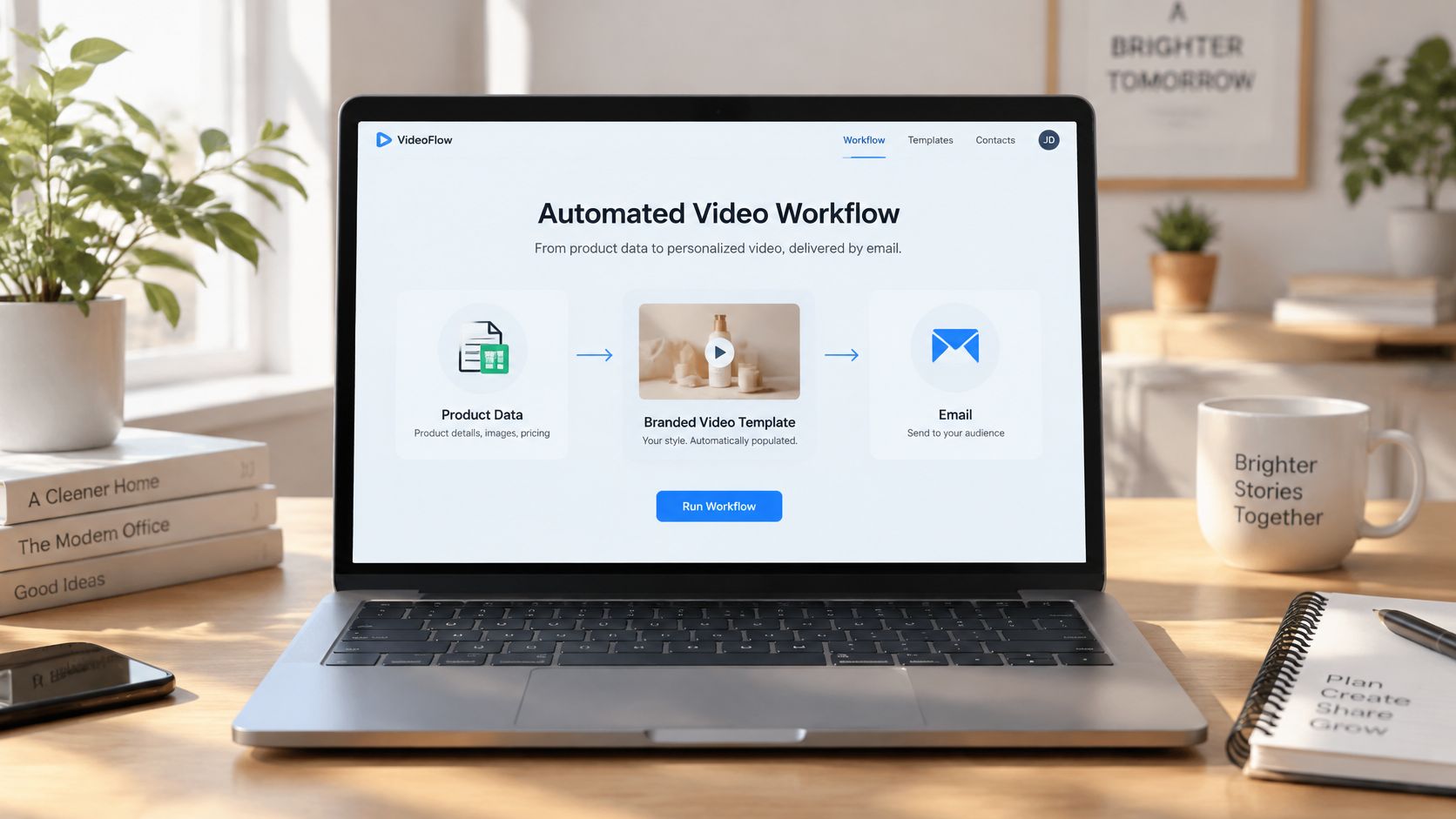
Connect Source Data to a Branded Template
Think of it like this. Your CRM, product catalog, or HR record supplies the names, plans, and approved feature lines. Your branded template holds the layout, logo, and scene order in place.
When a record changes, that change fires the trigger. The finished file then moves through your connected systems to email, a learning portal, social channels, or an internal site for employees and partners.
Take the SaaS launch as an example. Product ops edits one approved feature description, and refreshed language versions are ready within minutes, pending translation checks and review. Nobody rebuilds each scene by hand.
A trigger starts production, not permission to publish unchecked claims.
The hard part is making dozens of versions from live data without turning each one into manual work. For that setup, Wideo’s enterprise AI video generator is a good place to start the conversation with their team. Confirm the connections you need before you build.
Apply the Same Pattern Across Departments
The same idea works outside product marketing. An insurance team can pull approved coverage fields into short clips for agents, so every explanation matches current wording. HR can pull role and location fields to build the right onboarding lessons without sharing extra employee details. Ecommerce teams can send care instructions right after purchase, and operations can turn approved reporting fields into stakeholder updates.
Each use needs its own template and checks, because a purchase follow-up and an executive report answer very different questions.
For a practical setup pattern, see this guide to connecting production workflows through Zapier. Start with one event and one destination, so duplicate entries, missing fields, and failed deliveries are easy to spot.
Teams sorting out how AI apps connect to outside systems can also read up on MCP tools and data access. Treat it as background architecture, not proof that a specific platform supports MCP.
Before you expand, record which source fields changed, which template version ran, and who owns the destination. That keeps every output tied to an approved business reason.
Pilot one approved update with one reliable trigger before connecting more departments.
Keep Humans in Control of Every Release
Just because production can start fast doesn’t mean you’re ready to publish. With AI video creation for teams, you need three human gates so speed doesn’t turn a rough claim into a promise you can’t keep.
For that multilingual product update, name your reviewers before anyone hits generate. Think of them as release owners, not a big group copied on opinions about transitions.
Intelligent production shortens the edit; people still decide what the company is willing to say.

The script gate happens before any voiceover exists. Have product check every feature claim against the release notes. For finance or insurance topics, legal should review rates, exclusions, and qualifying language too.
Lock that source script once, then treat it as the truth for every language version. This guide to creating a storyboard helps tie each approved line to the scene that supports it.
Check Meaning Before Releasing Every Version
The template gate covers brand and facts while fields get filled in. Brand checks type, color, and logo use, while product or legal confirms the inserted details still say what was approved. A fintech clip might show the right rate but drop the condition attached to it. Have reviewers read the narration, captions, and on-screen numbers together, because that match matters more than a clean layout.
The final gate belongs to the audience owner.
| Review Owner | Release Decision |
|---|---|
| Sales lead | Is the offer clear for this audience? |
| HR lead | Can employees follow the required steps? |
| Language reviewer | Does each translation preserve the approved meaning? |
For the multilingual version, reviewers focus on meaning, pronunciation, and qualifiers instead of rebuilding scenes. If a translation shifts the promise, send that line back before it goes out.
Review isn’t just about accuracy. It’s about usefulness. Confusing onboarding drives support tickets, and vague training leaves gaps that cost time later.
Make review required for regulated or customer-facing work, and name who can sign off each version.
A solid trigger only works when a clear production agreement sits behind it. For AI video creation for teams, that means locking the template, the allowed inputs, review owners, and the final destination before you connect any live data.
Start with a customized branded template that teammates can reuse without editing skills. Logo placement, typography, scene timing, and the closing message stay fixed, and you mark which text and images are safe to change.
Treat the template as a contract between creative decisions and business data.
Prepare Templates and Shared Resources
Pick one storyboard pattern you can repeat: a strong opening, a simple explanation, some proof, then a clear next step. Use that flow for explainers, ecommerce offers, and internal updates instead of letting each department invent its own process.
Keep approved assets in one shared folder so no one has to guess. That includes cleared music and voice options, subtitle rules with on-screen text styles, and language versions with expiry dates and a named maintainer. Distributed colleagues then can’t grab old files.
For practical planning, explore repeatable video automation workflows. Use setup calls with the enterprise team to confirm template needs and technical scope rather than assuming every connection works.
Define Permissions and Data Connections
Write down who can change claims, which fields data may fill, and which outputs need human approval. These enterprise AI governance insights from Ekipa give helpful context for adding AI without losing oversight.
Then map your CRM, product catalog, LMS, or form inputs to names, products, languages, and dates. Confirm each connection on its own, and agree in advance on what happens when a required value is missing.
| Application | Setup Decision |
|---|---|
| HR training | Map role and language to approved lessons. |
| Nonprofit fundraising | Require consent for beneficiary stories and imagery. |
| Telecom marketing | Restrict plan prices and expiry dates to approved sources. |
| Enterprise operations | Assign reporting periods and metric owners before generation. |
Assign Delivery Ownership Before Testing
Name a delivery owner for the social calendar, learning portal, or internal channel that receives each file. That person confirms the audience, the publish timing, and how the video gets replaced when details change.
Before launch, test with missing data, an expired claim, and a changed language field. Route every exception to a person, not straight to the public.
Decide now whether your next request enters a queue or a system.
Who Should Own the Workflow Across Departments
Give one template owner clear responsibility for the shared structure. Each department still owns its own brief and message approval. That owner usually sits in marketing operations or internal communications, wherever brand resources already live.
Think of a SaaS company running one product update template across teams. Sales adds buyer benefits, customer success adds onboarding steps, and HR adds employee guidance. No one needs a separate studio for each group.
Share the production structure, not responsibility for every department’s claims.
Setting Up Without an Agency
A simple demo can start with material you already have, so there’s no need to commission a new shoot. Open the editor, import your videos and images, and give each scene one product benefit to explain.
For ecommerce, show the product in use first. For SaaS, show the real interface, not a mockup. Keep the scope tight so a buyer underst
Related posts:
 Your Guide to AI Video Generator Technology
 A Guide to AI Video Creation for Beginners
 AI Avatars: The New Face of Business Communication
 AI Avatars: The Secret Weapon for Business Growth and Efficiency
 AI Technology: The New Creative and Strategic Core of Business
 12 Powerful AI Tools for Video Creators in 2025


