An AI product video generator turns a structured catalog feed into thousands of catalog-accurate dynamic assets without filming, editing, or hand-building each cut. The category is already commercial at scale, with one widely cited forecast putting the narrow AI video generator market at $716.8 million in 2025 and $847 million in 2026 (Fortune Business Insights).
Meta description: AI product video generator workflows turn product titles, images, prices, and features into SKU-specific audiovisual pieces at scale, without manual editing.
The E-commerce Scale Problem

Most ecommerce teams don’t have a creative problem, they have a coverage problem.
A boutique brand with fifty SKUs can still hand-produce polished visual content for each item if the team is patient enough. A marketplace with five thousand or fifty thousand products can’t do that, so most pages settle for static photography and a short block of copy. That gap matters because buyers now browse in feeds, search results, and mobile storefronts where still images have to fight harder for attention.
An AI product video generator closes that gap by turning the catalog itself into the source of truth. Title, images, price, features, and category data become the inputs. The output is a repeatable recorded message that looks like it was built for the item, because it was.
Practical rule: If the product page already has enough data to sell the item, it probably has enough data to produce a first-cut audiovisual piece.
That shift changes the economics of content. Instead of asking, “Which products deserve a shoot?”, teams ask, “How do we give every SKU a usable visual treatment?” The answer is usually a systematic workflow, not a one-off campaign.
For ecommerce teams that need to connect product pages to a structured creative workflow, the logic behind how video lifts ecommerce conversion matters more than the format itself. The point is not to make every product cinematic. The point is to make every product visible.
A product catalog that ships with video on every page feels different to shoppers and merchandisers alike. The merchandiser stops treating video as a hero-item luxury, and the shopper stops seeing blank, photo-only listings as a sign of low effort.
How the Generator Turns Data Into Visual Content
An ai product video generator works best when it behaves like a production line, not a prompt toy.
From catalog fields to sequence logic
The pipeline starts with structured inputs, usually product title, description, price, image set, variant data, and a few feature tags. Those fields feed a template engine that knows where each element belongs, which image should open the piece, and which lines should appear as on-screen text. If the product description is clean, the generator can turn it into narration or captions without a human writer rewriting every SKU.
The important part is not randomness. It’s consistency. The same master template can be reused across a whole range, while each product fills in its own data layer and image order.
When teams need to clean source records before generation, guidance on choosing enrichment tools is useful because weak product data creates weak output. Missing attributes, inconsistent titles, and messy image naming all show up in the finished asset.
Practical rule: The better the catalog feed, the less work the generator has to do after the first render.
Why image sequencing matters
Good systems don’t just drop product photos into a slideshow. They sequence images so the first frame establishes the item, later frames show angles or variants, and motion effects give the piece a sense of progression. That’s where object tracking, pan motion, zoom timing, and text placement matter.
This is also where serious tools differ from generic text-to-video systems. In product work, you don’t want the model improvising a chair, a bottle, or a label that isn’t in the catalog. You want the output to stay anchored to the source assets.
For teams comparing product systems, the Wideo AI video generator is one example of a workflow that can start from product inputs and move toward structured generation rather than blank-page editing.
Business Applications and Measurable Impact
A 5,000-SKU marketplace running paid social needs a consistent asset format across product pages and ad variants. An AI product video generator turns catalog inputs into short, SKU-specific videos for landing pages, paid social, and campaign testing. Teams can compare click-through rate, product-page engagement, and conversion by format instead of judging creative from a static gallery. See these Wideo ecommerce video templates for a practical starting point.
The acquisition value is clearest for products where motion explains use. Travel gear can show storage or portability, cosmetics can demonstrate application, small appliances can show operation, and telecom bundles can clarify what the offer includes. The template carries the visual rules, while each product feed supplies the name, benefits, images, and variant details.
Sales teams and channel partners can use the same system for repeatable pitch assets. A finance, insurance, or real estate offer can retain approved language, branding, and product details across presentations, partner portals, and retail materials. That reduces the manual work of rebuilding decks and makes review easier because every version traces back to the same source fields.
Onboarding and retention content follows the same data-to-template process. Account type, plan tier, or product variant can determine the walkthrough shown in email, in-app messaging, or a support portal. Employee training teams can apply the workflow to internal launches, policy refreshers, and regional versions, provided the underlying records and approved scripts are maintained.
Practical impact usually appears in these areas:
- Acquisition pages gain a product demonstration layer for every eligible SKU.
- Launch campaigns ship with consistent creative across a new collection.
- Training and onboarding use template-controlled scripts rather than ad hoc writing.
- Stakeholder updates turn the same source data into easier-to-review presentation assets.
- Catalog maintenance lets new products enter an established production workflow.
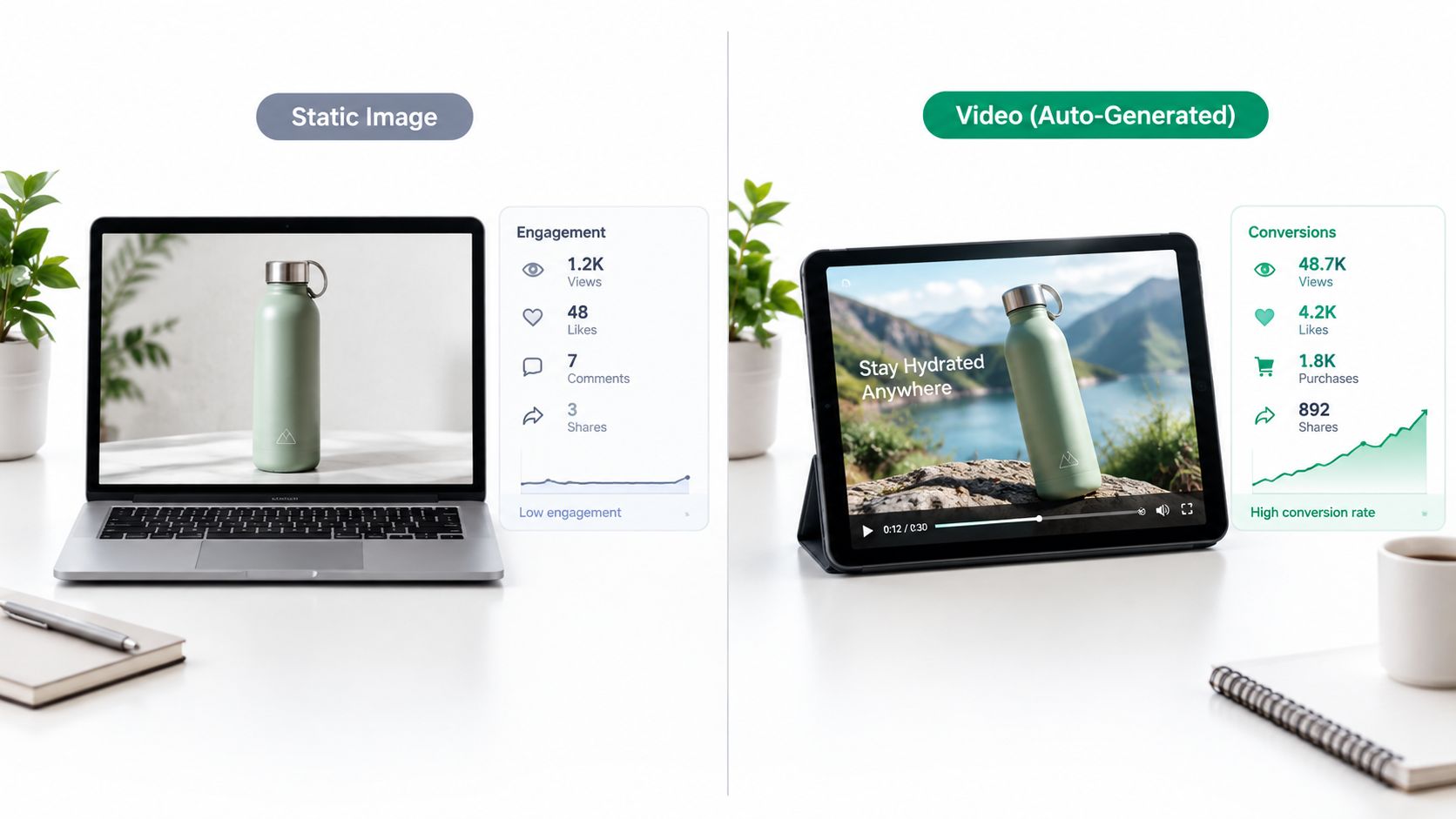
Narration and localization add another operational layer. AI audio tools for video editors can support consistent voice tracks and faster versioning across products, regions, and channels. The business case is not more software. It is replacing repeated manual assembly with a controlled production pipeline that can be measured, reviewed, and updated when catalog data changes.
Essential Features and Platform Selection Criteria
Not every tool that says “AI” can run a product catalog.
Platform Feature Comparison Matrix
| Feature Category | Beginner Tools | Enterprise Generators |
|---|---|---|
| Data ingestion | Manual text paste, limited imports | Product feeds, CSV, API, CRM and ERP connections |
| Template control | Basic layouts | Brand-safe master templates across SKUs |
| Output consistency | Varies by prompt | Stable logos, colors, pacing, and text rules |
| Localization | Limited or manual | Narration and on-screen text variants |
| Distribution | Download and upload | Direct publishing and workflow triggers |
The biggest dividing line is control. Beginner tools are fine for one-off creatives, but enterprise generators need API access, brand-kit enforcement, and output rules that keep every SKU on brand. They also need localization, because a catalog that serves multiple markets can’t rely on one language track.
Tools like AI product design tools point in the same direction, since product teams increasingly want the source asset and the finished dynamic piece to stay aligned from the start. That doesn’t mean a designer disappears from the process. It means the designer defines the guardrails once, then the system applies them hundreds of times.
Rule of thumb: If the platform can’t keep a logo, color set, and text hierarchy stable across many outputs, it’s not ready for catalog work.
Case Study Automating a Seasonal Collection Launch
A mid-sized ecommerce brand launches a seasonal collection with 240 SKUs. The old process is familiar, shoot ten hero products, edit those pieces manually, and leave the long tail with photos only. That works for a press moment, but not for the rest of the catalog.
The new workflow starts when the Shopify feed updates. The data map pulls in title, description, price, variant images, and category tags. A single master template then assigns opening frames, motion rules, captions, and narration style to every item in the collection.
The change is immediate. New products can publish with a visual asset the moment they’re added to the catalog, instead of waiting for a creative backlog to clear. The brand doesn’t have to decide which items deserve motion and which don’t, because the template treats the collection as a system.
For teams that need to do this without a manual editing queue, platforms like Wideo can handle product-driven generation through a workflow built around catalog data and branded templates. See the ecommerce workflow here: Wideo ecommerce automation.
The operational win is not only speed. The store presents the entire collection with the same polish on day one, which makes merchandising, paid social, and product page maintenance far simpler.
Market Trends and Adoption Milestones
The category has moved beyond curiosity. One 2026 industry summary says monthly active users across AI video platforms passed 124 million in January 2026, and another reports that Kling AI alone had 60 million global creators producing more than 600 million videos (Pictory AI statistics). Those are usage signals, not theory.
What matters for product teams is where the workflow is going. Image-to-video is becoming the more practical commercial pattern because brands already own product photos, and those photos preserve accuracy better than pure prompt generation. Short-form output also fits ecommerce behavior, since product discovery is happening in fast, scroll-heavy environments.
The technical direction matches the market direction. Model architectures are getting better at preserving object identity and temporal continuity across frames, which makes them more suitable for catalog work where the label, packaging, or form factor can’t drift from shot to shot. That’s a real requirement, not a nice-to-have.
The broader trend is simple. Buyers want product visuals that are fast to produce, easy to localize, and reliable enough to publish at scale.
Implementation Workflow and Final Checklist
Start with the data source. Clean the product feed, remove duplicates, and make sure each SKU has the fields the template needs. Next, build one template per product family so the structure stays consistent while the details change.
Then define the automation trigger. A new product added to Shopify, a price update in your catalog, or a tagged inventory change can all kick off generation. After that, send the finished asset to the storefront, ad platform, or email workflow that needs it.
A short review loop still matters. Marketing should audit a sample of outputs for text accuracy, image order, and compliance before the first full catalog run goes live. That keeps scale from turning into noise.
For teams that want a more systematic setup, Wideo video automation and no-code video automation are relevant reference points because the core challenge is not rendering a single asset, it’s keeping the workflow repeatable.
- Check source fields: Confirm titles, prices, and feature data are complete.
- Lock the template: Use one brand-safe layout per product family.
- Test the trigger: Verify that catalog updates start generation correctly.
- Review distribution: Make sure the right versions reach the right channel.
- Audit outputs: Spot-check for errors before mass publication.
If every new product still waits on manual editing, you’re paying a hidden tax on scale. Why keep treating catalog video like a luxury when the catalog itself can generate it?
Wideo helps teams turn product data, templates, and automation triggers into repeatable audiovisual pieces without manual editing. If you want to see how that workflow can fit ecommerce catalogs, visit Wideo and explore the product-driven options available for your store.