
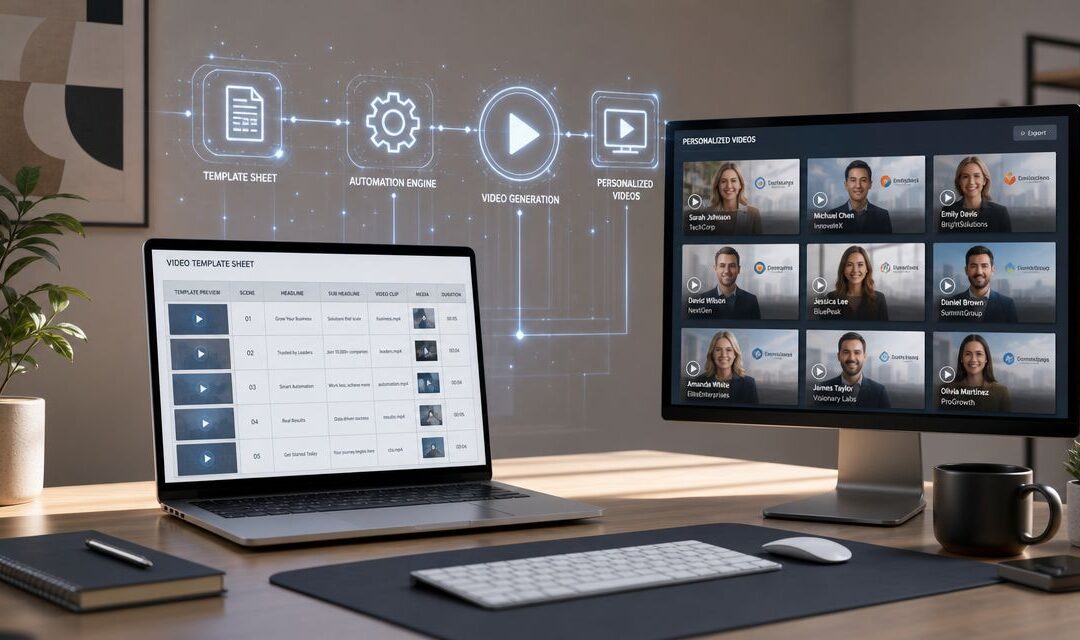
You know the job. Someone asks for 500 versions of the same recorded message with different names, products, regions, or account details, and suddenly a marketing ops team is acting like a post-production house.
That’s why video automation software matters. The adjacent market for AI-powered video editing software was valued at USD 656.8 million in 2023 and is projected to reach USD 1,032.0 million by 2032, according to Market.us. That growth tracks with what teams already feel every day. Manual production cycles don’t fit modern campaign volume.
The Manual Video Bottleneck You Know Too Well

A familiar failure pattern shows up when a company treats visual content as a creative side project instead of an operating system. The team has a strong campaign idea, a polished master file, and a deadline that looked reasonable on Monday. By Wednesday, someone is manually swapping names, changing screenshots, exporting files, renaming assets, and uploading them one by one for email, paid social, onboarding, or sales follow-up.
That process breaks in the same places every time. Branding drifts because people make rushed edits. Turnaround slows because every revision requires another export cycle. Sales and customer success start asking why they can’t get one-to-one assets for their segments, and ops knows the answer is ugly. The workflow was never built for repeatability.
If your current production queue feels stuck, this piece on how to unstick your video marketing is worth reading alongside this one because the root issue usually isn’t creativity. It’s system design.
A good example of the operational shift appears in this story about how Tribes brought video marketing in-house and increased productivity.
The real bottleneck usually isn’t making one strong audiovisual piece. It’s making the next 300 without rebuilding the process every time.
What Video Automation Software Actually Is

Traditional editors like Premiere Pro or Final Cut are built for craft work. They’re excellent when an editor needs full creative control over a single audiovisual piece. They are not built to act like a business engine that takes rows of customer data and turns them into thousands of approved outputs.
The three pillars that matter
Real video automation software rests on three connected parts.
A template system comes first. The master design holds approved scenes, timing, brand elements, and placeholders for variables such as text, images, logos, or offers.
Then comes data integration. According to Creatomate’s explanation of template-centered automation, a master design contains placeholders for variables like text and images that are populated programmatically from a spreadsheet or API call before rendering. That architecture is what makes mass personalization technically feasible.
The third part is bulk rendering. Once the template and data are connected, the system generates outputs in batches instead of asking a human to recreate the same scene again and again.
For teams that want a practical no-code view of this model, Wideo’s page on no-code video automation shows the workflow clearly.
Why this changes how companies work
This is bigger than marketing production.
A retailer can send context-aware abandoned cart reminders. A SaaS company can create onboarding assets by plan type or lifecycle stage. HR can issue repeatable training clips for different departments. Internal communications can turn leadership updates into mass-producible dynamic assets instead of static emails and PDFs.
That’s the difference. You’re not buying another editing tool. You’re putting a programmed content layer on top of your operational data.
How Real Businesses Apply Programmed Video
An e-commerce team can use programmed visual content for abandoned cart recovery. The template holds the brand design, product frame, price area, and CTA. The data file inserts customer name, viewed item, and product image, then sends the finished recorded message into the email platform. Manual production would mean rebuilding each file. A systematic workflow means the same campaign can run every day without piling work onto design.
A SaaS company can pull account data from Salesforce and create user-specific onboarding assets by role, plan, or implementation stage. A new admin sees setup steps. An executive sponsor gets rollout milestones. A customer success manager receives a clean dynamic asset for handoff and renewal communication. That’s where video starts acting like part of customer operations rather than a one-time launch asset.
An agency can produce hundreds of white-label client videos every month by separating what must stay fixed from what should change. Brand-safe scenes, transitions, and timing stay inside the template. Client logos, metrics, offers, and contact details come from a spreadsheet, CRM export, or API. The agency stops staffing repetitive edit work and starts managing a repeatable service line instead.
For teams already trying to simplify campaigns with connected tooling, this guide on how to simplify campaigns with REACH’s automation tools fits the same operating principle. The system matters more than the isolated asset.
Wideo’s own examples around video automation for companies are useful because they reflect this shift from one-off production to programmatic delivery.
Weak ideas still fail. Automation speeds execution, but it can’t rescue a weak angle, poor offer, or irrelevant message.
That’s the trade-off many teams miss. Machine-driven production removes labor. It doesn’t replace strategy.
The Non-Negotiable Features of an Automation Platform
Buying the wrong platform usually means buying a nice editor with a few batch shortcuts.
What matters is whether the system can support repeatable output across channels and teams. HP’s analysis of AI in production notes that strong automation platforms solve distribution bottlenecks too, including reframing for platform-specific aspect ratios and handling localization tasks for multi-platform publishing, which removes a lot of manual labor from channel adaptation in social and web workflows through automated post-production and formatting workflows.
Use this checklist:
-
Template control: Fixed brand scenes with variable placeholders for names, products, regions, dates, or account details.
-
Structured data input: CSV uploads, CRM connectivity, and API access so dynamic assets can be generated from real records.
-
Batch rendering: Hands-off production for large runs instead of export-by-export editing.
-
Distribution readiness: Multiple aspect ratios, subtitles, localization support, and channel-specific outputs.
-
Enterprise operations: White-label options, permission control, and stack compatibility through tools like HubSpot, Salesforce, and Zapier.
If a platform can’t do those jobs, it’s not really built for automation. Wideo’s core platform features map closely to that buyer criteria.
The Platform Built for This Workflow
The architectural shift that matters is moving from local editing to cloud-based generation. Shotstack describes video automation as a defined workflow run by software, and notes that cloud-based APIs let teams edit and render multiple dynamic assets simultaneously without managing servers. That’s the key requirement for enterprise-ready production across marketing, training, and customer communications in programmatic cloud video workflows.

Wideo fits well for ops-led teams. It supports CSV-driven creation, CRM-connected workflows, API-based rendering, white-label delivery, and a template model that matches how marketing ops needs to work. That matters for the three scenarios above. An e-commerce brand can feed cart data into a master template. A SaaS team can trigger onboarding sequences from Salesforce or Zapier-connected events. An agency can keep client branding separated while producing mass-producible outputs from one controlled design system.
What tends to go wrong in setup
Messy data is the usual problem.
Empty fields, inconsistent formatting, and bad naming conventions cause broken scenes and awkward outputs. The practical fix is simple. Clean the source data first, add fallback values in the template, and test a small batch before you render the full run.
Putting Your Video System in Motion
A practical rollout looks like this. Start with one data source such as a CSV export or CRM list, connect it to one approved template, trigger rendering from a campaign event or workflow tool, then distribute the finished assets by email, landing page, sales sequence, LMS, or internal comms channel. If you want a simple trigger model, this walkthrough on automating video creation with Wideo’s Zapier integration is a useful reference. What’s the one production bottleneck in your team that still depends on someone manually exporting the same asset over and over?
If your team is treating visual content like a one-off creative task, you’re carrying manual work that software should already be handling. Wideo is worth evaluating when you need templates, data inputs, and repeatable delivery in one system for marketing, onboarding, training, and client communication.
Related posts:
 Automated video presentations for tech product launches
 Automated custom thank-you videos for non-profit donors
 Automating user-generated content for e-commerce brands
 Patient safety education through automated video content
 Virtual tour videos for hospitality automation
 Enterprise Video Throughout the Modern Workday


