
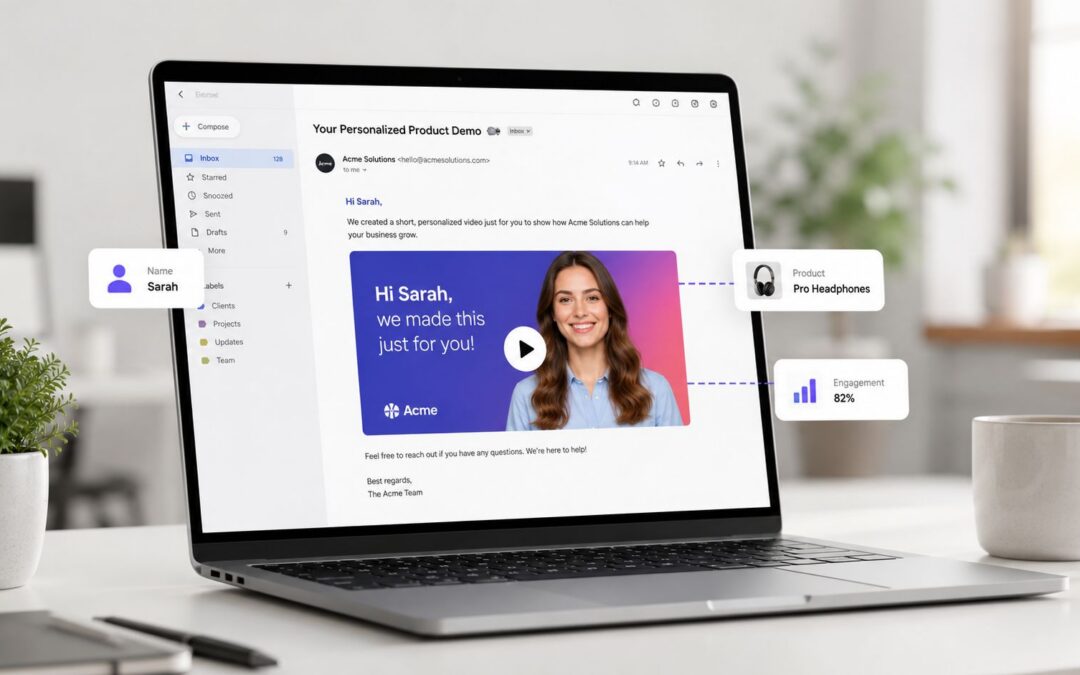
That data matters, but the bigger point is operational.
Email video personalization is still often treated like a special campaign request. A marketer writes a brief, a designer builds one asset, approvals drag on, and the finished piece goes to an audience that’s far broader than the message deserves.
Beyond First Names Video as a Business System
A company in manual mode produces visual content like a studio project. A company in system mode produces it like infrastructure.

The difference shows up long before the email is sent. In the first model, sales wants one version for prospects, customer success wants another for onboarding, HR wants one for internal rollout, and no team shares templates, triggers, or data fields. In the second model, the business builds one repeatable chassis. Brand elements stay fixed. Message layers change by role, lifecycle stage, account status, or recent behavior. The recorded message becomes a system output, not a one-off deliverable.
Two operating models
One SaaS company sends the same “welcome” email to every trial user. Another sends a context-aware audiovisual piece based on the feature the user selected at signup, the company size in the CRM, and whether the account owner booked a demo. Both companies technically “use video.” Only one has built email video personalization.
Operational rule: If a team has to open an editor every time it needs a new version, it hasn’t built a system yet.
This is why the conversation has to move beyond thumbnails with a first name. Marketing uses it for acquisition. Sales uses it for deal progression. Customer success uses it for onboarding and renewal reminders. Internal teams use the same machine-driven approach for policy updates, manager briefings, and employee training. If you want a practical model of personalized video workflows, start with shared templates and shared data, not more creative requests.
Mapping Personalization Opportunities Across Your Organization
Independent 2025 research reports that 88% of high earners and 86% of digital-first consumers want personalized video, and that personalized video is 3.5x more likely to make someone become or stay a customer than generic video, based on Idomoo’s 2025 consumer trend research.
That doesn’t mean every department needs flashy production. It means every department should ask a harder question. Where does a static email currently fail because it ignores context?
Acquisition and sales
An ecommerce team can trigger a dynamic asset when a shopper abandons a cart. The data source is the cart itself. The trigger is abandonment. The output is a short recorded message showing the product left behind, the category, and a relevant call to action. That’s far more useful than a generic “come back” email.
A real estate team can send one-to-one property follow-ups after a viewing request. The system can swap in neighborhood visuals, listing price band, and agent details without rebuilding the whole asset. Sales enablement works the same way in B2B SaaS. If a prospect downloaded a security guide, the next email shouldn’t repeat a general pitch. It should address implementation risk, compliance concerns, and the buyer’s role.
Generic personalization says “Hi Sarah.” Context-aware personalization says “Here’s what matters for a security lead evaluating rollout risk.”
Onboarding and retention
Customer onboarding is where this gets practical fast.
A finance platform can send a user-specific welcome sequence based on account type and first action completed. A travel company can deliver booking confirmation emails with destination-specific next steps. An insurance carrier can route claim-status updates with segment-specific language for policyholders, brokers, or internal adjusters. In each case, the dynamic asset reduces confusion because it reflects what the recipient just did, not what the brand hopes they care about.
Internal communication and training also belong here. HR can send a role-based benefits explanation during enrollment. Operations leaders can distribute regional process updates with localized details. Education providers can issue learner progress emails that reference the course path already started. Those are use cases, not marketing tactics. Teams exploring broader video use cases across departments usually find that onboarding, training, and lifecycle communication produce the clearest early wins because the trigger logic is already sitting inside existing systems.
Designing Your Dynamic Video Blueprint
A good template works like a chassis.

The static pieces carry brand consistency, pacing, and structure. The dynamic zones carry relevance. When teams mix those up, they either create brittle templates that break under variation or cosmetic edits that look custom but say nothing new.
What should change
The best blueprints don’t start with “what can we insert?” They start with “what decision or action should this email cause?”
- Identity fields: name, company, account owner, location
- Behavior fields: product viewed, feature used, cart left behind, milestone reached
- Business context: plan type, renewal state, claim stage, portfolio category
- Message framing: beginner versus advanced guidance, buyer versus admin language
- Call to action: book a call, finish setup, review status, complete training
A SaaS onboarding asset might keep the intro, brand frame, and walkthrough structure fixed while changing the examples shown on screen. A media company can keep the same format for advertiser recaps while swapping audience segment visuals and campaign highlights. An enterprise ops team can use the same internal template every quarter and update only the metrics narrative, business unit label, and stakeholder action.
Build for reuse, not novelty. The template should survive hundreds of sends without needing creative surgery.
When teams need to generate large volumes of renewal notices or onboarding messages from CRM data, tools can handle the variable layers without manual editing. For example, platforms like Wideo’s video automation workflow support that template-driven model after the blueprint is defined. If you need more conceptual guidance before building, this walkthrough on how to create a personalized video is a useful framing reference.
The Hands-Off Workflow Automation and Integration
The workflow is simple on paper. The hard part is making each handoff dependable.

Industry guidance points to a strong baseline process: segment recipients by behavior or firmographic data, generate dynamic variants with placeholders like name, company, or recent action, then send through automation and measure open rate, click-through rate, view duration, completion rate, and conversion rate, as outlined in D-ID’s personalized video email workflow. The same guidance notes that email clients don’t handle direct playback consistently, so the safer technical path is usually a thumbnail or preview image linked to a hosted MP4.
The machine in practice
A customer data platform, CRM, or product database holds the facts. A trigger fires when a person enters a segment, completes an action, misses a milestone, or reaches a renewal window. The system passes that data into the template. The finished dynamic asset gets hosted, and the email platform inserts a linked preview.
That model works across industries. A university can trigger applicant reminders after incomplete enrollment steps. A car dealership can send service reminders based on vehicle status and appointment history. A customer success team can queue adoption nudges when usage drops.
Some teams stitch this together with native integrations. Others use no-code orchestration to connect the steps. If you need a practical way to automate workflows without coding, the key is mapping ownership first: who controls the data, who approves the template, and who watches failures.
A company could apply this with a simple chain: CRM or product event data feeds a master template, a programmed trigger generates the right version when a contact meets a condition, and the email platform sends a thumbnail linked to the hosted asset. Distribution can happen through lifecycle campaigns, sales sequences, onboarding drips, or internal announcements. The cleanest setups keep asset creation separate from send logic, so teams can change the message without rebuilding the whole system. Teams that want to connect these steps through existing tooling can review Wideo’s Zapier-based automation approach.
Beyond Clicks Measuring Impact and Avoiding Pitfalls
Benchmark reporting cited by Air Traffic Control references 29% higher unique open rates and 41% higher unique click rates for personalized emails, while also noting that email video can lift click-through rates by as much as 300% when relevance and segmentation are handled well in this review of personalization and email performance.
Those metrics matter, but they’re not enough.
What to measure after the click
If the recipient clicks and abandons the hosted page after a few seconds, the email did its job and the message failed. Teams need to look at view duration, completion rate, downstream conversion, and whether the recipient took the intended action for that lifecycle stage. For training, that action may be policy acknowledgement. For onboarding, it may be account setup. For sales, it may be meeting progression.
The more important distinction is strategic. Cosmetic personalization inserts visible tokens. True dynamic relevance changes the actual message according to buyer state, role, or current need. If the content would make sense even after removing the inserted fields, it probably isn’t personalized enough to justify production complexity.
Watch the trap: a customized thumbnail can raise curiosity while the message itself stays generic.
There’s also an operational blind spot that many teams ignore. Current guidance often discusses relevance but leaves a gap around deliverability and inbox placement. As noted in Pirsonal’s discussion of personalized email video implementation, teams still have to think about spam filtering, load times, rendering, file size, and accessibility across devices and email clients. That’s why linked previews usually beat heavy in-email playback in production environments.
For measurement discipline, keep one testing question alive at a time. Test a different trigger, a different message frame, or a different call to action. Don’t test everything at once. If you need a framework for measuring marketing video performance, tie each metric to one business event, not to vague “engagement.”
The New Standard for Business Communication
Email video personalization isn’t a creative add-on anymore.
It’s a business communication layer that sits on top of your data, your lifecycle logic, and your operating model. Companies that still send the same static email to every prospect, customer, employee, or partner aren’t just missing a tactic. They’re running an outdated communication system.
The shift matters across acquisition, sales enablement, onboarding, retention, internal communication, employee training, and stakeholder reporting because each of those functions already runs on triggers, fields, and states. Once you see that, the path gets clearer. Stop asking how to make one more campaign asset. Start asking which recurring message deserves a repeatable, enterprise-ready template and a machine-driven delivery path.
That’s the new standard. Static messages for everyone, or context-aware communication built from live business data.
Is your email system still sending content, or is it ready to send decisions?
Teams that need to turn CRM fields, onboarding triggers, or lifecycle events into repeatable visual communication can explore Wideo as one option for building template-based, data-driven recorded messages without relying on manual editing for every send.
Related posts:
 The Digital Marketer’s Guide to Video in Email
 Your Expert Briefing on the Video Email Blast
 A Marketer’s Guide to Email Marketing with Video: Your Questions Answered
 A Marketer’s Guide to Video in Email: How to Boost Engagement and Conversions
 How to Embed a Video in an Email That Actually Works
 Video in Email Marketing: From Campaign to Business System


