

Kling AI has already moved beyond the “creative toy” category, but that doesn’t mean it can produce a finished campaign on its own. Kuaishou reported more than 60 million creators, over 600 million generated videos, and partnerships with more than 30,000 enterprise users by December 2025, while its annualized revenue run rate reached US$240 million. Those figures establish Kling AI as a serious production input, not proof that every generated clip is ready for a customer. Kuaishou’s December 2025 report points to the key question for marketing directors: can your team turn short, uncertain generations into approved, repeatable business assets?
The Video Brief That Broke the Team
A mid-sized SaaS company briefs its internal team on a launch film: a 90-second product explainer, five languages, one consistent spokesperson, animated interface overlays, and separate cuts for paid social, the website hero, and sales enablement.
The team initially treats the job like a conventional shoot. Someone owns the script, another person books production, a designer prepares the interface animation, and an agency estimates a multi-week schedule. Then the creative lead tests Kling AI and discovers the central production constraint: the model generates short clips, not a complete 90-second narrative that arrives with approved typography, brand rules, captions, legal copy, and distribution formats.
That gap changes the brief. Kling becomes a raw-asset engine for product demonstrations, presenter moments, transitions, and concept footage. Human editors still control the narrative, brand system, claims, localization, and final approval. Teams that write a precise brief before prompting will save rework, so the Wideo guide to writing a successful video brief is useful even when Kling supplies the source material.
The bottleneck moved downstream
Generation is no longer the only production concern. Assembly, length, consistency, rights clearance, voice review, subtitles, and stakeholder approval now determine whether a campaign ships.
Kling’s original operating envelope was described as reaching 1080p, 30 frames per second, and clips as long as two minutes, although availability and quality vary by model version and product tier. Kuaishou’s launch announcement makes clear why version control matters. A team can’t plan a production line around a remembered feature from an earlier release.
A practical brief should separate the work into four owners:
- Creative owner: defines the message, audience, scene purpose, and acceptable visual direction.
- Generation owner: creates candidate shots, records prompts, and flags failed or unstable outputs.
- Brand owner: checks logos, colors, product interfaces, spokesperson identity, and claims.
- Distribution owner: assembles captions, aspect ratios, voice tracks, approvals, and publishing files.
Production rule: Treat Kling AI like a camera department that delivers possibilities, not like an editor that delivers a campaign.
That distinction applies across industries. An airline can generate destination atmosphere for a route announcement, an insurer can create a visual metaphor for protection, and a nonprofit can test a fundraising scene before committing to a full shoot. None of those teams should let the generated clip bypass factual review or brand control.
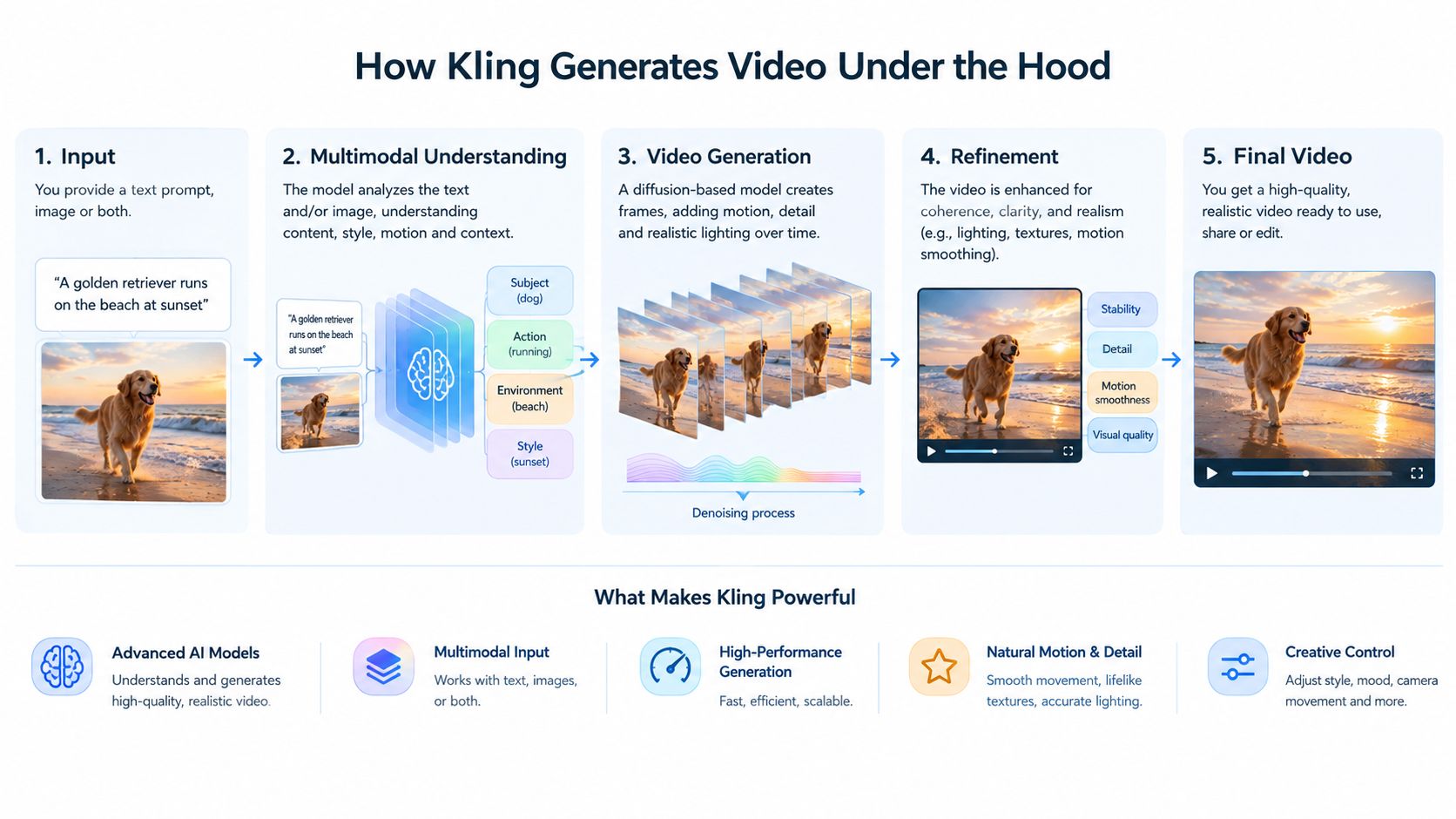
How Kling Generates Video Under the Hood
Kling’s original architecture combines a diffusion-based Transformer, known as a DiT, with a proprietary 3D variational autoencoder, or 3D VAE. The technical design matters because it helps a marketing team predict where a generation is likely to hold together and where it may drift.
A DiT treats the visual sequence as a connected problem. Instead of thinking about each frame as an isolated picture, it models spatial details inside frames alongside changes across time. Kuaishou describes a computationally efficient full-attention mechanism for temporal modeling, designed to process those relationships together. That approach supports more coherent movement when a camera travels through a scene, a person turns, or an object changes position.
Why the 3D VAE matters to marketers
The 3D VAE compresses spatial detail and temporal change together, then reconstructs the result as moving pixels. You can think of it as a compact working representation of both what a scene looks like and how it changes.
That design can help preserve texture, lighting, and subject movement inside a short clip. It doesn’t guarantee identity stability across separate generations, though. A vehicle may change trim details between shots, a spokesperson’s face may drift, and an interface may display inaccurate text. Those failures become more likely when a prompt asks for too many actions, locations, objects, and transitions at once.
The practical lesson is simple. Ask for one business purpose per shot: a vehicle reveal, a product rotation, a destination view, a presenter reaction, or a transition into a dashboard screen. Then place those shots into a controlled editing workflow. Teams building a repeatable process can compare this raw-generation stage with the AI video generator workflow, which describes script creation, voiceovers, generated footage, and trigger-based production as separate operational steps.
Kling’s architecture is strongest when the brief gives it a focused visual task. It’s weaker when the prompt asks it to act as director, cinematographer, editor, copywriter, translator, and compliance reviewer at the same time.
What the 3.0 Generation Changes
Marketing teams should be careful with the label Kling 3.0. No verified Kuaishou source confirms a specific 3.0 release name, current maximum duration, or complete language list, so treat those claims as unconfirmed until you check your account. The documented newer unified direction is Kling O1, combining text-to-video, reference-based generation, start and end frame interpolation, inpainting, transformation, style re-rendering, and shot extension. It supports 3 to 10 seconds of generation. Kuaishou’s O1 announcement is the safer reference for capability planning.
That distinction matters for production forecasts. Verify the exact model name and account-level capabilities before promising multi-shot sequences, shared audio, or multilingual dialogue to stakeholders. Plan Kling as a source-asset generator, not as proof that a finished campaign can be produced inside one prompt.
| Capability | What It Does | Business Use Case |
|---|---|---|
| Multi-shot generation, where available | Connects several visual beats into a more coherent sequence rather than producing only isolated moments | A SaaS team can test a short product story that moves from presenter introduction to interface demonstration and closing reaction |
| Shared audio timeline, where available | Coordinates dialogue, ambience, music cues, and sound effects within the generated sequence | A travel marketer can prototype a destination scene with spoken copy and environmental sound before editorial assembly |
| Native or model-generated dialogue, where available | Produces spoken content alongside the visual performance, subject to model and language support | A training team can evaluate a presenter concept in several markets before commissioning final voice production |
| Reference-conditioned generation | Uses images, video, or subject references as inputs for a more directed result | An ecommerce team can create product scenes from approved pack shots while checking every label and logo |
| Short-form source clips | Delivers focused visual units instead of a complete long-form campaign | A dealership can create vehicle-detail shots and combine them with price, offer, disclaimer, and contact information in an editor |
The business value comes from combining these capabilities inside a governed workflow. A multilingual spokesperson-style asset can reduce the need to reshoot every market, but it still requires script review, pronunciation checks, subtitle review, and local approval. A multi-angle product scene can give an editor useful material, while a controlled product render remains the safer choice for exact packaging or regulated claims.
What remains unchanged
Short clip limits still shape the production plan. Brand-exact visuals are not guaranteed across separate generations, and human review remains required for identity drift, temporal artifacts, inaccurate text, unsafe claims, and cultural mistakes.
A marketing director should track a usable-assets ratio, not a generation count. Measure how many candidate clips become approved assets after retries, editing, localization, and legal review. That figure belongs in the campaign forecast because it reflects throughput, review time, and the actual cost of turning generated footage into shippable video.
Where Kling Fits in a Business Video Stack
Kling is a raw-asset generator, not a complete business video system. A shippable asset still needs a narrative, brand typography, captions, music or voice timing, legal copy, calls to action, and a publishing format.
For a 60-second sales explainer, onboarding sequence, training update, or stakeholder report, Kling can provide a presenter moment, visual metaphor, distinctive shot, or reference-led scene. A template-based editor should handle the approved structure around it, including layouts, customer data, typography, logos, disclaimers, and channel versions.
Keep generation and assembly as separate production layers. Kling supplies visual material that would be expensive or slow to stage from scratch. The template layer controls information that must remain accurate and repeatable. Human review sits across both layers, checking claims, faces, products, audio, and local versions before distribution tools send the final asset to a website, sales team, learning hub, or social channel.
A template editor manages structure, captions, typography, logos, disclaimers, and reusable layouts. See the Wideo video automation workflow for how triggers and data sources can drive that layer. Teams producing short social cuts can also use the Exerta guide to short form video to make decisions about pacing and format.
The operating choice depends on the job. A SaaS company can place a generated interface scene inside a product launch, while an insurer should rely more heavily on a controlled template for policy education. HR teams can repeat one training format for internal updates. A travel brand can combine generated destination footage with structured offer text and market-specific captions.
Kling and a template platform solve different operational problems. Kling increases the supply of visual options. The editor turns selected footage into consistent, reviewable business communication.
Implementation workflow
Start with a structured source such as a product catalog, CRM field, route update, policy record, or training brief. Map that data into an approved template, use a programmed trigger to create the relevant asset, then route it for review and distribution. Generated Kling footage can provide the visual input while the template controls business information that must remain accurate.
Track provenance throughout production. Connect the prompt, source references, model version, editor project, reviewer, and final approval to the published asset. This record makes retries, corrections, localization, and governance easier to manage, and it exposes the actual cost of turning generated footage into shippable video.
A Five-Language Product Explainer in Practice
A SaaS company launches a new analytics dashboard and needs one 90-second explainer for English, Spanish, Portuguese, French, and German audiences. The piece will run on the website and in paid social, with one core message but different spoken and written language.
The marketing lead uses Kling AI to create short product-oriented scenes. One clip shows the dashboard from a broad perspective. Another moves toward a key reporting panel. A third presents a spokesperson-style explanation. The team asks for visual variety, but it doesn’t assume that every generated interface label, logo, or person will remain exact.
Those clips then enter a pre-approved storyboard. The editor controls the opening, product claim, call to action, logo placement, captions, and transition timing. Each language receives its own script and review queue, while the raw visual scenes remain reusable where they don’t contain language-specific text.

The workflow should not claim that one generation automatically solves localization. Native dialogue, when available in the selected Kling version, can help the team prototype a speaker performance. Final voice, lip-sync, subtitles, terminology, and claims still require language review. A team can use Wideo’s subtitle workflow as a separate finishing layer without treating it as a Kling integration.
The single source of truth
The company stores the approved English master, translated scripts, pronunciation notes, subtitle files, visual references, and reviewer decisions in one project record. Each market owner checks product names and legal language before publication.
That record supports more than marketing. Sales can use the same explainer in outreach. Customer success can place it in onboarding. Support can reuse selected scenes in a help center. Internal teams can adapt the narrative for training without starting from an empty timeline.
The result is not “one prompt created five campaigns.” The result is a controlled production system that reuses raw footage, structured copy, and approved layouts across markets.
Commercial Use, Likeness, and Brand Risk
A paid plan or commercial-use permission doesn’t clear every element inside a generated scene.
Kling’s community policy says users must respect reputation, likeness, privacy, copyright, and trademark rights, and prohibits copying or distributing others’ content without authorization. That means a marketing team still owns the clearance problem when a prompt describes a recognizable executive, a real storefront, a copyrighted character, a competitor’s mark, or footage supplied by a customer.
The main risk surfaces are identifiable people, third-party intellectual property, and confusingly similar branding. A generated spokesperson may resemble a real person even when the prompt never names them. A background product may carry a recognizable design. A logo may appear close enough to a competitor’s mark to create a review issue.

A clearance process that survives review
Use a four-part check before publication:
- Review the prompt: remove unauthorized names, copyrighted characters, sensitive customer details, and instructions that imitate a living person.
- Inspect the output: check faces, logos, product shapes, background locations, interface text, and music.
- Obtain final approval: route regulated claims, financial messaging, health information, insurance language, and public-facing spokesperson content to the appropriate reviewer.
- Keep a metadata log: connect the published file to its prompt, source assets, model version, editor, reviewer, and approval date.
Music needs the same discipline. A visual asset may be cleared while its soundtrack is not, so a practical resource on royalty-free beats for commercial use can help teams define a separate audio-rights checklist.
The Wideo terms and conditions are also a reminder that platform terms are only one part of a production decision. Your company must still clear the people, inputs, brands, claims, and jurisdictions represented in the final asset.
Governance rule: Ship quickly, but keep a paper trail that explains who approved every customer-facing generation.
When to Use Kling, Wideo, or Both
The decision should follow the asset’s risk and repetition level, not excitement about the newest model.
Choose Kling alone for a short, brand-light concept where visual novelty matters more than exact copy, logo placement, or a long script. A media team might use it for a campaign mood piece, a travel atmosphere shot, or an internal creative prototype. The team still reviews the output, but the asset doesn’t carry the full burden of product accuracy.
Choose a template-based editor alone when the content is repetitive, compliance-heavy, or owned by a junior marketer. Insurance explainers, employee training, customer updates, real-estate listing variants, and financial onboarding usually benefit more from controlled text, reusable layouts, and predictable approvals than from generated characters.
Choose both when a campaign needs fresh visual material plus repeatable packaging. That is the strongest case for a SaaS launch, dealership campaign, airline update series, nonprofit appeal, or ecommerce program with many audience and language variants.
| Criteria | Kling Only | Wideo Only | Kling + Wideo |
|---|---|---|---|
| Best fit | Short concept footage and brand-light creative | Structured, repeatable, compliance-sensitive assets | Distinctive raw scenes placed inside controlled campaigns |
| Throughput measure | Approved clips after retries | Finished assets from templates and data | Approved assets after generation, assembly, and review |
| Review time | Visual, identity, rights, and factual checks | Copy, brand, accessibility, and legal checks | Both generation review and template approval |
| Licensing overhead | Prompt inputs, likeness, music, and references | Platform assets, uploaded media, voice, and business rights | All relevant inputs plus the handoff record |
| Main failure | Attractive clip that cannot carry the message | Efficient asset that lacks visual freshness | Uncontrolled generation or weak approval between layers |
A defensible pilot should compare the same brief across the three paths. Use the opening period to test Kling-only concepts, then recreate the brief with a controlled template, then combine generated shots with the approved structure. Record usable clips per 100 credits, retry rates, practical runtime, review minutes, and the number of assets rejected for brand or rights reasons. Those measures are more useful than leaderboard claims.
The broader business case supports that discipline. A late-2025 survey of 266 respondents found that 93% of video marketers said visual content increased product or service understanding, 82% reported increased web traffic, 85% reported lead generation, and 83% said it directly increased sales. Wyzowl’s survey also found that 82% considered video marketing to deliver good return on investment. Connect those outcomes to traffic, leads, sales, onboarding completion, training participation, or retention, rather than counting generated files.
McKinsey estimates that generative AI could raise marketing-function productivity by an amount equivalent to 5% to 15% of total marketing spending, with a potential 3% to 5% increase in sales productivity relative to current global sales expenditures. Its analysis supports using Kling as one component in a broader workflow, not treating it as a replacement for editorial judgment.
Kling AI is worth piloting when your team needs new visual material and can maintain review discipline. A template platform is the better layer when accuracy, repetition, localization, and distribution matter more than spectacle.
Wideo provides templates, LLM-written scripts through OpenAI or Gemini, AI voiceovers, generated footage and images from prompts, and workflows triggered by forms, APIs, or other events. Visit Wideo to evaluate whether that controlled production layer fits alongside Kling AI in your campaign system, then test both against one real brief before committing budget.
Related posts:
 Your Guide to AI Video Generator Technology
 A Guide to AI Video Creation for Beginners
 AI Avatars: The New Face of Business Communication
 AI Avatars: The Secret Weapon for Business Growth and Efficiency
 AI Technology: The New Creative and Strategic Core of Business
 12 Powerful AI Tools for Video Creators in 2025


