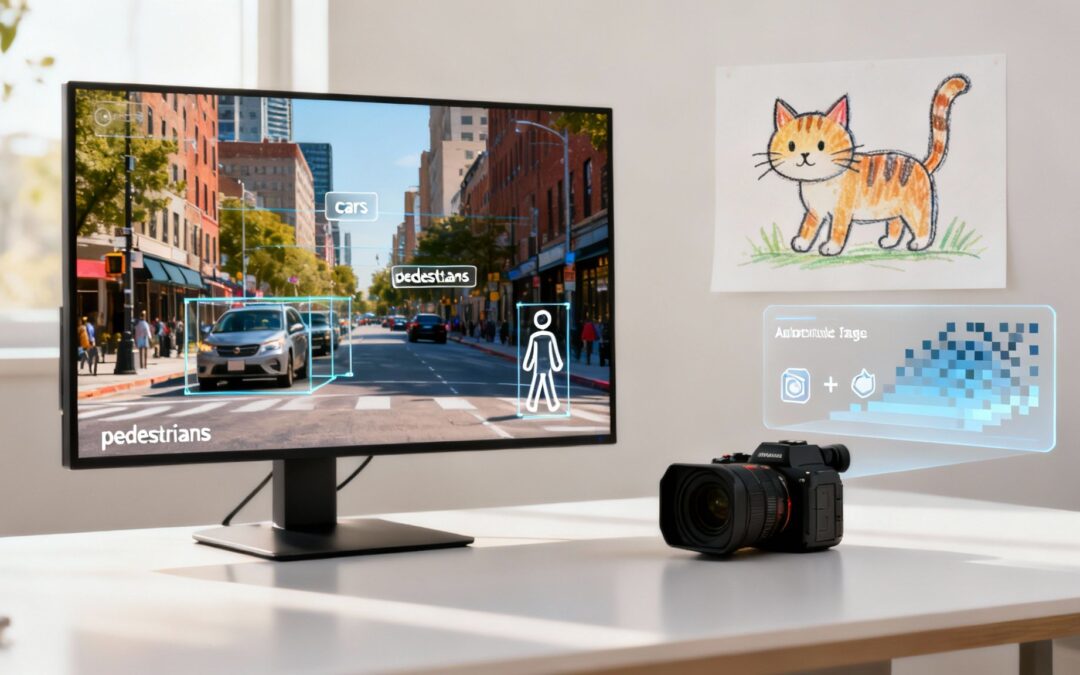
At its core, computer vision is the field of artificial intelligence (AI) that teaches computers how to see and understand the world around them. It gives machines the ability to interpret digital images and videos, identify objects, and then react based on what they perceive—much like a human does.
How Computers Learn to See the World
Think about how you’d teach a child what a cat is. You'd probably show them a few pictures, pointing out the whiskers, pointy ears, and long tail. After a few examples, they get it. Computer vision follows a surprisingly similar logic, just on a massive scale. Instead of a handful of pictures, a machine needs to see thousands, or even millions, of labeled images to reliably tell the difference between a cat, a dog, or a bicycle.
This all starts with raw data. A computer doesn't see a "cat" in a photo; it sees a grid of pixels. Each pixel is just a number representing its color and brightness. To turn that numerical mess into something meaningful, developers rely on sophisticated algorithms and deep learning models to sniff out the patterns hiding in the data.

The Training Process Simplified
The journey from seeing pixels to recognizing a complex scene involves a few key steps. This foundational process is what allows a machine to build up its visual intelligence. If you want to go deeper into the technical side, this is a great breakdown of what Computer Vision is and how it works.
Here's a quick look at how the training happens:
- Data Collection: First, you need a massive dataset of relevant images. For our cat example, this means gathering countless photos of cats—different breeds, in different settings, from different angles.
- Labeling and Annotation: Next comes the human touch. People meticulously go through these images and label them. Every photo of a cat gets tagged with "cat," so the algorithm has a ground truth to learn from.
- Model Training: The labeled dataset is then fed into a neural network. The model churns through the data, analyzing the pixel patterns associated with the "cat" label and learning to spot features like furry textures, feline shapes, and those tell-tale pointy ears.
- Testing and Refinement: Finally, the model is put to the test with a fresh set of unlabeled images. Can it correctly identify the cats on its own? If it stumbles, the model is tweaked and retrained until it hits an acceptable accuracy level.
By repeating this cycle millions of times, the computer vision model gets incredibly good at recognizing the specific patterns that define an object. It's less about truly understanding what a cat is and more about mastering the statistical probability that a certain arrangement of pixels represents one.
The Building Blocks of Machine Sight
To really get what computer vision is all about, you have to look at the specific jobs it does. Think of these jobs as individual tools in a toolbox. Each one is designed to solve a different piece of the visual puzzle, and they all work together to build a complete picture of what a machine "sees."

These tasks build on each other. At the most basic level, a system might just need to tell you if a specific object is in the frame. But from there, the challenges get much bigger, moving toward figuring out the precise location, boundaries, and even the relationships between many different objects in a busy, moving scene.
From Identification to Understanding
The core computer vision tasks move from simple to complex, with each step adding another layer of detail to the machine’s interpretation of an image or video. This is what makes advanced applications possible—from self-driving cars navigating traffic to automated video editors that can understand scene changes.
Three fundamental techniques form the foundation:
- Image Classification: This is the most straightforward task. It answers the question, "What is in this image?" The model takes in the whole picture and slaps a single label on it, like "cat," "car," or "beach."
- Object Detection: Taking it a step further, object detection not only identifies what’s in the image but also where it is. It draws a bounding box around each object it finds, answering, "There is a car in the top-left corner and a pedestrian on the right."
- Image Segmentation: This offers the most fine-grained detail. Instead of just a box, segmentation outlines an object pixel by pixel. It’s like creating a perfect silhouette, knowing exactly which pixels belong to the car and which belong to the road behind it.
At the heart of all this are Convolutional Neural Networks (CNNs). Think of a CNN as the specialized "brain" for visual tasks. It's a type of algorithm inspired by the human visual cortex, built to automatically spot and learn patterns—like edges, textures, and shapes—straight from the pixel data itself.
The Power of Neural Networks
CNNs are the real workhorses of modern computer vision. They process images in layers, and each layer looks for increasingly complex features. The first few layers might just spot simple edges and colors. The next layers combine those to recognize textures and basic shapes. Deeper still, the final layers piece everything together to identify complex objects like faces or vehicles.
This layered approach is incredibly effective, allowing models to learn the distinct visual characteristics of objects with startling accuracy. Because of this, CNNs have become the go-to for everything from simple classification to the pixel-perfect segmentation needed for medical imaging or background removal in a video call. The model’s ability to build understanding from simple patterns to complex objects is the key to its power.
Real-World Applications in Marketing and Video
Enough with the technical jargon. Let's get down to what really matters: how computer vision can actually solve problems for marketers and video creators. This isn't some futuristic concept; it's a practical tool that’s here today, ready to automate tedious work, uncover fresh insights, and help you create way more engaging content.
Imagine having a system that watches every second of your footage for you. Instead of a human manually sifting through hours of video, computer vision algorithms can scan entire libraries in a flash. They automatically identify and tag everything—objects, scenes, text, even brand logos. Suddenly, your entire content archive is instantly searchable. It transforms a static storage folder into a smart, active asset.

Streamlining Video Creation Workflows
One of the most immediate benefits is felt right in the production process. By understanding the visual content of a video, computer vision can take over tasks that once ate up hours of manual editing. This frees up your creative team to do what they do best: tell great stories.
This kind of automation opens up some powerful new doors:
- Automated Tagging: Systems can generate metadata by recognizing what’s in a video. For example, a clip could be automatically tagged with keywords like "beach," "sunset," and "family," making it dead simple to find and reuse later.
- Intelligent Scene Detection: Computer vision can pinpoint distinct scene changes, cuts, and key moments. This allows for the automatic creation of highlight reels, trailers, or snappy social media clips without an editor having to scrub through the entire timeline.
- Brand Monitoring: Marketers can use CV to track where and how their logo pops up across user-generated content or broadcast media. This gives you valuable data on brand visibility and the context in which it appears.
The core benefit is efficiency. By delegating the repetitive, time-consuming aspects of video analysis to a machine, teams can produce more content, faster, and with greater consistency.
Powering Personalized and Accessible Content
Computer vision also unlocks a whole new level of dynamic and inclusive content. Instead of a one-size-fits-all video, your content can adapt to individual viewers, which leads to much higher engagement.
A key application here is personalized video, where elements within a scene can be dynamically swapped out based on viewer data. You can learn more about how to create these tailored experiences in our guide to personalized video marketing.
This technology also makes video content more accessible to everyone. By analyzing what’s happening on screen, computer vision models can automatically generate descriptive audio tracks or captions for visually impaired audiences, ensuring nobody misses out on the action.
The future for this tech looks incredibly bright. The global computer vision market is on track to blow past USD 23 billion by 2025 and could hit nearly USD 58 billion by 2030, thanks to its growing use in manufacturing, autonomous systems, and media. You can dig into these projections in this comprehensive industry report. This explosive growth shows a clear demand for smarter, more efficient ways to understand visual data across every industry—and marketing is right at the heart of it.
How to Implement Computer Vision in Your Business
Bringing computer vision into your business doesn't mean you need a team of PhDs on standby. The path you take really depends on what you want to achieve, your technical resources, and your timeline. Figuring out the main ways to get started is the first step toward a smart decision that actually fits what you need.
For a lot of businesses, the quickest and most budget-friendly way in is through pre-built Application Programming Interfaces (APIs). Think of these as "computer vision as a service." Big players like Google Vision AI or Amazon Rekognition have already put in the hard work, training powerful models on huge datasets. You get to tap into that power with a simple API call.
This route is perfect for standard tasks like spotting objects, recognizing text, or moderating content. You just send your image or video, and the service sends the analysis right back. It's fast, it scales, and it doesn’t require a ton of in-house technical skill, which makes it ideal for getting a prototype off the ground or adding proven features quickly.
Choosing Your Implementation Path
While APIs are incredibly fast, they don't give you a lot of control. If your project needs more customization or has to run on your own servers for privacy or speed, other options offer more flexibility. Your decision will probably boil down to a trade-off between speed, cost, and control.
Here are the three main ways to go:
- APIs (Application Programming Interfaces): The best choice for speed and simplicity. You get access to world-class models without the headache of training or maintaining them, and you only pay for what you use. The trade-off? Less customization for very specific or niche tasks.
- SDKs (Software Development Kits): This is the middle ground, giving you more control. SDKs like OpenCV or NVIDIA's toolkits offer pre-built functions and libraries that your developers can use to build custom applications. It requires more technical know-how but lets you create tailored solutions.
- Custom Models: This is the most resource-heavy path. Building a model from the ground up gives you total control and the power to solve unique problems that no off-the-shelf tool can touch. But be prepared—it demands a serious investment in data, talent, and computing power.
For marketers and video creators, the decision usually starts by pinpointing the problem. Are you trying to automatically tag thousands of video assets, or are you aiming to build a one-of-a-kind interactive experience? Your answer will point you to the right tool for the job.
Making the Right Choice for Your Team
For most marketing and video projects, kicking things off with an API or a user-friendly platform just makes sense. Tools with computer vision already baked into their features, like an AI video generator, can give you immediate results without a steep learning curve. These platforms handle all the technical complexity behind the scenes, so you can focus on the creative side of things.
As you look at your options, consider tools that specialize in specific video tasks. To really weave computer vision into your workflow, checking out resources that list the best AI tools for video background removal can be a huge help. This lets you find solutions perfectly matched to what you’re trying to produce. At the end of the day, the best approach is the one that lines up with your team's skills and gets you the fastest return on your investment.
Understanding the Benefits and Limitations
Computer vision is a powerful tool, but let's be realistic about what it can and can't do. Knowing its strengths and weaknesses helps you make smarter decisions on where to invest your time and money, so you can skip the common pitfalls and tap into its real potential.
The upsides are huge. At its best, computer vision acts as a force multiplier for your team. It automates repetitive visual tasks at a scale no human could ever hope to match. This leads directly to massive efficiency gains, whether that’s instantly tagging an entire video library or monitoring brand mentions across social media.
Beyond simple automation, it unlocks a much deeper layer of data analytics. By analyzing visual information from customer videos or product usage, you can spot patterns and insights that were completely invisible before. This helps you understand your audience on a whole new level.
The Advantages in Practice
The benefits of bringing computer vision into your workflow ripple across the business, impacting everything from internal operations to the customer experience.
- Increased Efficiency: Drastically cuts down on the manual labor needed for jobs like content moderation, video tagging, and quality control.
- Enhanced Data Insights: Pulls valuable, actionable information from unstructured visual data like user-generated content and product photos.
- Improved User Experience: Opens the door to cool features like visual search, augmented reality try-ons, and hyper-personalized video content.
Navigating the Real-World Hurdles
But this technology isn't a magic wand. One of its biggest limitations is its total dependence on data quality. A computer vision model is only as good as the data it was trained on. If that data is biased or doesn't reflect real-world scenarios, the model's performance will tank, leading to inaccurate or even unfair results.
The most common point of failure for computer vision projects isn't the algorithm itself, but the data used to train it. Algorithmic bias, stemming from unrepresentative datasets, can create systems that fail spectacularly in unpredictable environments.
Plus, getting high accuracy in complex or chaotic environments is still a tough nut to crack. A model trained to recognize cars on a sunny day might completely fail in heavy rain or fog. The cost and sheer complexity of building and maintaining custom models can also be a barrier, demanding specialized expertise and a ton of computing power.
The growing economic importance of this field is clear; the U.S. market for AI in computer vision is projected to soar to nearly USD 95.92 billion by 2034, driven by its adoption in critical systems. You can read more about the market's rapid expansion. Acknowledging these limitations is the first step toward building computer vision solutions that are both effective and responsible.
Navigating the Ethical and Privacy Maze
As computer vision gets smarter and shows up in more places, we have to talk about its impact on society. The conversation isn't just about what the technology can do, but what it should be allowed to do. With great power comes the need to be responsible, looking past the technical side to consider the real-world effects on people.
The speed at which this tech is being adopted tells a story about its economic weight. The global computer vision market was valued at around USD 20.5 billion and is on track to hit USD 34.3 billion by 2033, with the Asia Pacific region leading the charge. You can find more details on this market's growth trajectory. This incredible growth makes the need for clear ethical rules more urgent than ever.

Addressing Key Ethical Challenges
Finding our way through this new landscape means tackling a few big issues head-on. Public surveillance and the use of facial recognition tech bring up huge privacy questions. Without the right rules and clear consent, these tools could easily create a world where personal anonymity is a thing of the past.
Another massive challenge is algorithmic bias. If a computer vision model learns from a dataset that doesn't properly represent certain groups of people, it can lead to biased or discriminatory results. This isn't just a theory—it can create systems that are less accurate for women or people of color, accidentally cementing existing social inequalities.
Fostering a responsible approach is paramount. The goal is to build ethical AI systems that benefit society while actively protecting individuals through transparency, robust data security, and meaningful human oversight.
Building Trust Through Responsible Practices
For any business using this technology, building trust is non-negotiable. This means being upfront about how and why computer vision is being used and making sure personal data is handled securely. Sticking to strict data protection standards is simply the cost of entry. At Wideo, we detail our commitment to protecting user information in the Wideo privacy policy.
Here are a few key principles for using computer vision responsibly:
- Transparency: Be crystal clear about what data is being collected and what it will be used for. No surprises.
- Data Security: Put strong security measures in place to protect sensitive visual data from ever falling into the wrong hands.
- Human Oversight: Always keep a human in the loop. They should be able to review and override automated decisions, especially when the stakes are high.
Your Computer Vision Questions, Answered
As we wrap up, let's clear up some of the common questions that pop up around computer vision. Think of this as a quick-fire round to solidify what you've learned.
What Is the Difference Between Computer Vision and Image Processing?
It's a great question, and the distinction is pretty simple. Think of image processing as the how—it's like Photoshop. It enhances, sharpens, or changes the colors of an image, but it has no idea what it's looking at.
Computer vision, on the other hand, is the what. It's all about understanding. It looks at that sharpened image and says, "That's a golden retriever catching a red frisbee in a park." One modifies pixels, the other finds meaning in them.
How Much Data Does a Model Need?
This is the classic "it depends" answer, but for a good reason. The amount of data you need is tied directly to the complexity of the problem you're trying to solve.
If you just want to tell the difference between a cat and a dog, a few thousand well-chosen images might do the trick. But if you're building a system to spot tiny, specific defects in a manufacturing line, you'll need hundreds of thousands of examples to get the reliability you're after. The more nuance the task, the more data you feed the model.
Which Programming Languages Are Most Used?
Hands down, Python is the undisputed leader in the computer vision world. Its simplicity, combined with a massive ecosystem of powerful libraries like OpenCV, TensorFlow, and PyTorch, makes it the go-to for researchers and developers. These tools handle the heavy lifting so you can focus on building your model.
C++ is also a major player, especially when raw speed is critical. You'll find it in performance-hungry applications like robotics or real-time video analysis where every millisecond counts.
Ready to bring the power of smart video to your business? With Wideo, you can create stunning animated videos and presentations in minutes, no technical skills required. Start creating for free today!