

Meta description: AI Insurance Videos help carriers turn static policy docs, claims updates, and onboarding emails into governed, data-driven recorded messages that policyholders watch.
A policyholder opens a 40-page PDF, scrolls once, and closes it. The deductible is still unclear, the claims path is still buried, and the renewal date is just another line in a document that already feels too long. That’s why AI Insurance Videos matter, not as a marketing stunt, but as a better delivery system for information people need to understand and act on.
Insurers are already moving in this direction. A 2026 AM Best discussion reported that 41% of insurers were already using AI across core business areas, 63% had a formal AI policy, and 66% expected to increase AI investment over the next year or two, while nearly 60% expected AI to significantly transform their business model within one to three years, and only about 19% said implementation was already advanced, according to Deloitte’s discussion of the insurance AI market potential. That’s the backdrop for AI insurance videos, the communication layer that sits on top of underwriting, claims, onboarding, and service.
Why Static Policy Documents Fail Modern Policyholders
Insurance communication is dense by design. Static PDFs ask people to sort through coverage language, claims steps, and exclusions on their own, with no guidance. A carrier can send the right information and still leave the customer unsure, which is how avoidable calls, delays, and missed next steps pile up.
A better approach is a short, context-aware recorded message that uses the customer’s name, coverage type, and current status to explain what matters now. The same policy facts land differently when the delivery is direct and specific. In practice, that matters most in the workflows where people are already under pressure, including onboarding, claims, and coverage changes.
Practical rule: if the customer must act on the message, the message should be easy to hear, not just easy to file.
AI Insurance Videos fit that work. They help turn dense policy detail into something a policyholder can understand and use without wading through a packet. Wispra’s guide to update borrowers insurance for real estate is a good example of how coverage changes sit inside broader operational workflows, where clarity has to hold up under compliance review.
For teams that need to explain complex coverage without rebuilding every message from scratch, Wideo’s customer understanding use case shows the practical fit. The goal is simple: send the right explanation in a format people consume.
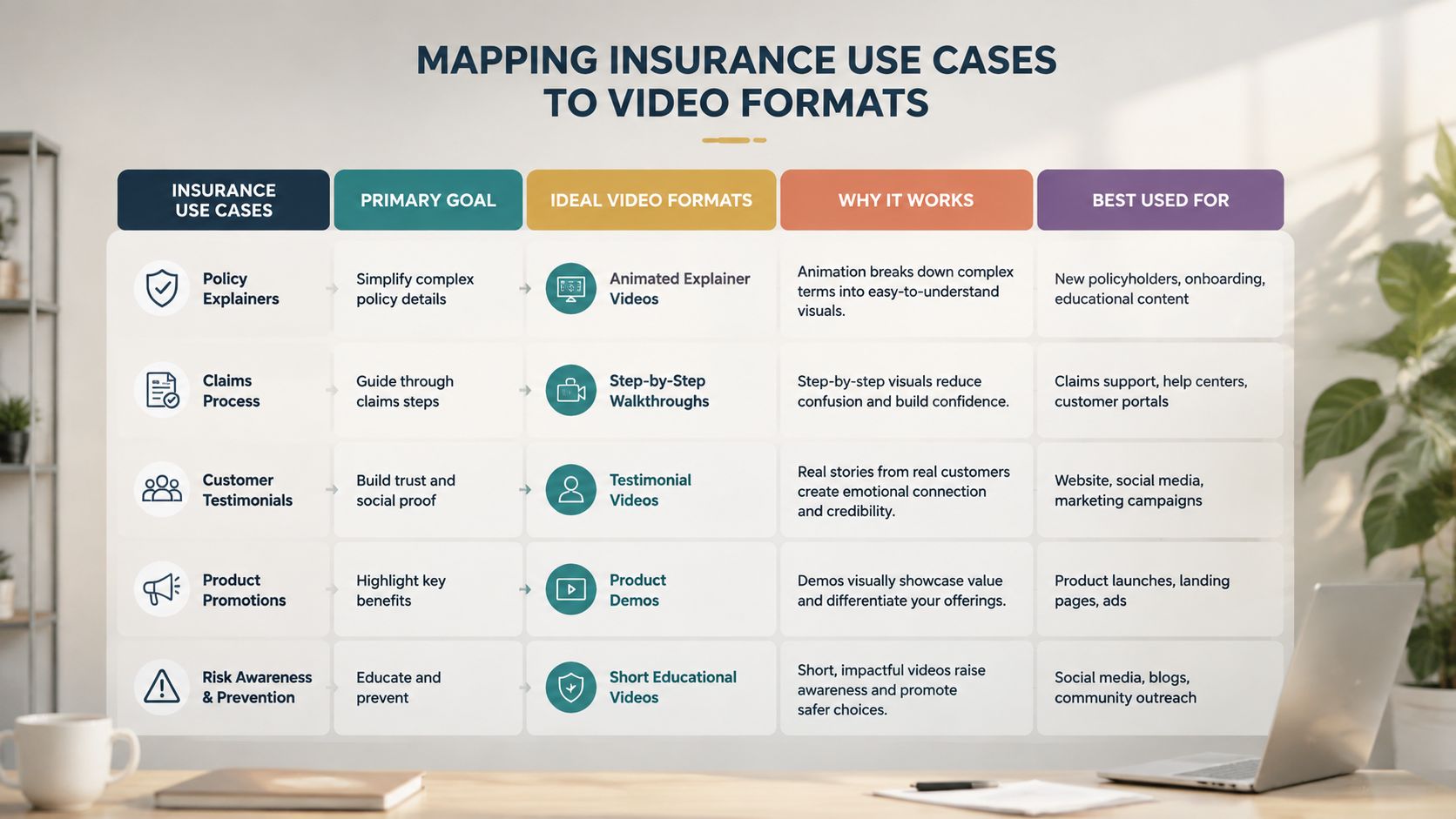
Mapping Insurance Use Cases to Video Formats
A claim update, a renewal notice, and a new-policy onboarding message solve different problems. They need different structures, different pacing, and different calls to action. A single template usually blurs those differences and slows down review.
Policy explainers
Policy explainers translate coverage into real-life scenarios. A renter does not need a definition of liability, they need to know what happens if water damage starts upstairs. The script should move from what you bought to when it applies to what to do next.
Claims status updates
For claims status updates, lead with the current state. The customer needs the status, the next step, and the handoff, not a long introduction to the claims department. Keep the tone calm and factual, because these messages often reach people who are stressed and scanning for action items.
Renewal and coverage-change notices
Renewal and coverage-change notices should support a decision. A renewal message cannot read like a generic mailing, because the customer already has coverage and needs a reason to pay attention to what changed. The strongest version is short, direct, and tied to the exact policy in force.
New-policy onboarding
Onboarding is where AI Insurance Videos can do real operational work. New customers need to know what is covered, where to find documents, and how to file a claim if something happens. The message should feel like a guided handoff for new customers, establishing where to find documents and how to file a claim if something happens.
If you are mapping this in a real organization, use Wideo’s use case library as a reference point, then separate each message by job to be done. A claims update should not borrow the script of a renewal reminder, and a quote shopper should not get the same flow as an existing policyholder. For more complex messaging, Wideo’s personalized video page shows how customer data can be tied to a repeatable template without turning every asset into a custom production.
Writing Scripts for AI Voice and Dynamic Data Fields
A script that works on paper can still fail in AI voice if the phrasing is too dense or the variable fields land in awkward places. Insurance teams need short clauses, plain verbs, and placeholders that fit where a speaker would naturally pause. That keeps the output clear, and it reduces the chance that a governed message sounds stiff or hard to follow.
Write for the ear. Fewer modifiers, more direct instructions, and tighter control over every variable that enters the final asset keep AI voice messages natural and compliant.
A claims update shows the difference. “Hi, Maria, your claim for water damage is in review. We’re waiting on one document, and your next step is to upload it in the portal.” That version works because the data fields sit inside a sentence a customer can hear once and understand. The legal meaning stays intact, but the delivery feels like a real service update.
Compliance rule: fixed fields should control the parts that matter, while the template keeps the rest of the message stable.
Governed templates let carriers repeat approved language at scale without drifting into accidental variation. If a variable is missing, the system should fail safely instead of guessing. If a coverage term is difficult to pronounce, a phonetic note can keep the recording clear without changing the meaning.
Teams that want a stronger technical baseline can review Wideo’s text to speech guidance before writing their first scripts. The practical test is simple. Read every line aloud, strip out anything that slows the voice, and keep only the data that changes the message.
Building the Data to Video Automation Pipeline
The workflow is straightforward once the governance is in place. Start with the data source, usually a CRM, policy administration system, or claims platform. Map the fields you need, name them clearly, and connect them to a single template so every rendered asset pulls from the same approved structure.
A useful implementation path looks like this:
- Data source: policyholder record, claim status, renewal date, or onboarding trigger.
- Template fields: name, policy type, next step, and any fixed disclosure.
- Trigger: a status change, renewal event, or new-policy issue.
- Distribution: email, portal, SMS link, or agent follow-up.
- Fallback logic: a missing field sends the record to review instead of publishing a broken message.
The value is consistency. A governed template means the data-driven version stays aligned with compliance language, while the system handles volume without a manual edit for every person. That’s where Wideo’s video automation page becomes relevant for operational teams that need repeatable output instead of one-off production cycles.
For carriers and agencies, the question isn’t whether a recorded message can be made faster. It’s whether the pipeline preserves accuracy when claims teams, service teams, and marketing teams all need different outputs from the same source of truth. When that’s done well, AI Insurance Videos become a business process, not a creative exception.
Measuring What Matters in Insurance Video
Building the pipeline is one thing. Proving it works requires different metrics than creative campaigns. Views still matter as a reach signal, but they do not show whether a policyholder understood coverage, filed a claim faster, or stopped calling the service center.
Insurance teams need metrics tied to behavior, because operations leaders and compliance officers care about what changed after the message went out. If a claims update is meant to cut confusion, measure whether repeated questions fell. If an onboarding video is meant to move a new customer to the next step, track completion and follow-through. Renewal content should be judged against the static version and the business action it is supposed to drive.
The scorecard should include completion rates, CTA engagement, and downstream actions. A claims video can be measured through call deflection or fewer support repeats. An onboarding message can be tied to whether the customer finishes the required step with less friction.
For a practical reporting framework, Wideo’s video measurement guide is a solid starting point for dashboards and comparison tests. In practice, I would test one static message against one AI Insurance Video for the same audience and trigger, then report on completion, support volume, and follow-through. That gives stakeholders a clearer read than a dashboard full of watch-time charts.
What gets measured in insurance should reflect policyholder action, not just attention.
Which Static Document Should Become Your First Video
Pick the one document your team gets called about most often. If three policyholders asked the same question this week, that is your first video. Claims updates, renewal notices, and new-policy onboarding packets are usually the best candidates, especially when they trigger repeat calls, carry time-sensitive instructions, or land during a stressful moment.
Score each candidate on three factors: support-call frequency, time sensitivity of the action, and the current comprehension gap, using call volume or survey feedback. A document that scores high on all three should move first. Keep the pilot tight. Use one governed template, one data source, and one distribution channel, then compare the response with the static version.
Which policyholder communication are you still sending as a static document that could become a thirty-second video instead?
Related posts:
 Your Guide to AI Video Generator Technology
 A Guide to AI Video Creation for Beginners
 AI Avatars: The New Face of Business Communication
 AI Avatars: The Secret Weapon for Business Growth and Efficiency
 AI Technology: The New Creative and Strategic Core of Business
 12 Powerful AI Tools for Video Creators in 2025


