
A rep records 14 follow-up clips before lunch, rewrites the same intro 14 times, fixes lighting twice, and still hasn’t touched the rest of the pipeline.
That routine feels personal, but it’s really a production bottleneck.
The Manual Video Trap
Manual sales recording starts with good intent and ends with math. A rep wants to send a one-to-one recorded message after every discovery call, renewal conversation, and stalled thread. By the third day, the team is spending prime selling time repeating the same pitch with slight variations, then copying links into email sequences by hand.
The problem isn’t effort. The problem is throughput.
A sales team can’t treat personalized video for sales like artisanal work if the target list spans trial users, open opportunities, renewals, and expansion accounts. Cold outreach in SaaS, policy follow-ups in insurance, property inquiries in real estate, and student recruitment in education all create the same operational mess. The message changes slightly, but the workflow stays painfully manual.
Manual recording is still useful for a strategic account or a tense renewal call. It breaks down when it becomes the default motion for the whole funnel.
That’s why one-off recording usually dies in the middle stage of adoption. Leaders ask reps to “use more video,” reps comply, then volume exposes the flaw. There’s a good reason more teams are rethinking the old approach in pieces like why one video isn’t enough for your business. A few handcrafted clips can help. They cannot run a revenue system.
From Personal Effort to Programmed Personalization
Sales teams often confuse personal effort with relevance. They think the rep has to say the prospect’s name on camera every single time for the message to count. That’s the outdated model.
Real personalization is context-aware visual content generated from customer data. Name, company, industry, trial status, location, recent activity, meeting notes, policy renewal date, account tier, onboarding stage. Those inputs shape the audiovisual piece without forcing a rep to rebuild it from scratch for every contact.

Cloudinary notes that 91% of consumers are more inclined to interact with brands that provide personalized digital experiences, and nearly 70% of customer success reps had adopted video messaging by 2023 in its summary of the shift toward customized digital communication and sales messaging through personalized digital experiences in video.
That matters far beyond prospecting. A finance company can send a one-to-one explanation of next steps after an application. An ecommerce brand can send a dynamic asset after cart abandonment tied to the shopper’s category interest. HR teams can issue role-specific onboarding material. Internal communications teams can turn dry updates into targeted visual content for managers, field teams, or executives. If you want a broader framing for this operational mindset, Kogifi’s piece on Implement AI for personalized experiences is a useful companion read.
Practical rule: if a rep must open a webcam and re-record the same message for each contact, the process is still manual, no matter how modern the tool looks.
No-code systems change the model. A team builds one master template, maps the variables, and lets the platform handle production. That’s the logic behind no-code video automation workflows. The rep stops acting like an editor and goes back to selling.
Designing Your Data-Driven Sales Plays
The strongest programs don’t start with “let’s make more videos.” They start with repeatable moments inside the funnel where relevance changes outcomes.
Cold outreach that doesn’t look mass produced
A SaaS SDR targeting operations leaders can tailor a recorded message by industry, role, and trigger event. A travel company can send agency partners a dynamic asset tied to destination inventory. A media company can send ad prospects a short visual built around audience fit instead of a generic pitch deck.
The data fields that usually matter most are simple:
- Identity data like first name or company, because it signals the message is meant for a real recipient
- Business context such as industry, role, or account type, which changes the framing
- Behavior signals like trial activity, browsing history, or product interest, which make the message timely
- Commercial stage such as open opportunity, renewal window, or expansion status, which shapes the call to action
For high-stakes interactions, tailoring clearly matters. Atlassian reports that personalized demos have a 37% higher conversion rate than generic demos in its guidance on personalized demo workflows.
Follow-up after meetings
Many reps waste the most time manually summarizing objections, next steps, pricing concerns, and implementation questions in separate clips for every stakeholder. The smarter route is to create a modular template where the opener, objection recap, and CTA change by deal stage or segment.

For teams generating outreach from CRM rows or CSV exports, platforms like Wideo for sales teams can map those fields into templates and generate large batches without manual editing. That’s useful in SaaS follow-ups, insurance quote recaps, real estate lead nurturing, and onboarding handoffs where the structure repeats but the account context changes. There’s a related SaaS example in personalized video across the sales funnel.
Renewal and upsell reminders
Customer success, account management, and lifecycle marketing all benefit from the same system. A fintech company can send renewal reminders tied to plan type. An education platform can issue course completion nudges. An ecommerce membership team can send reactivation messages based on prior orders or inactivity windows. Internal operations can even use the same model for stakeholder updates and reporting by region or business unit.
One sentence matters here. Don’t turn every renewal into a custom studio session.
The Automation Workflow in Practice
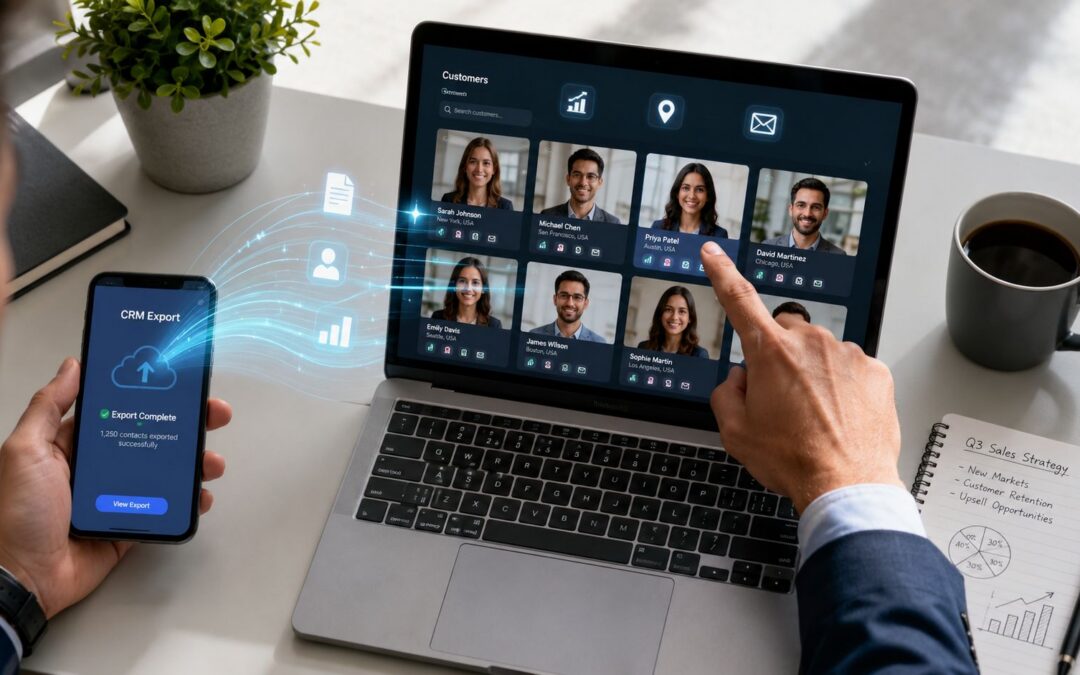
The implementation is simpler than many anticipate. Export account data from a CRM or spreadsheet, map each field to placeholders inside a template, trigger generation when a list is ready or a pipeline event fires, then distribute the finished assets through email, customer success sequences, onboarding flows, or internal channels.

D-ID reports that data-driven videos can generate 16 times higher click-to-open rates than generic outreach in its discussion of personalized video marketing performance. The same workflow logic shows up in adjacent operations too. Ecommerce teams thinking through trigger-based communication can borrow ideas from Carti’s Shopify store automation guide, then apply the same pattern to sales and lifecycle visual content. If you need the production side spelled out, creating a video automation workflow is the right operational lens.
Measuring Real Impact Beyond a Play Count
Play rate is easy to find and easy to misuse. Revenue teams should care more about replies, meetings booked, stage progression, sales cycle movement, renewals saved, and expansion conversations opened.

There’s also a measurement gap that too many teams ignore. Covideo notes that many guides focus on creation while skipping the testing framework, and argues for holdout groups plus open-to-reply attribution and pipeline-stage analysis in its piece on proving the impact of personalized video. That matters even more now that inbox conditions are harder and superficial engagement metrics don’t explain revenue impact.
If you can’t compare personalized outreach against a clean control group, you don’t know whether the visual content worked or the rep just had a better list.
The strongest programs treat video as business infrastructure. Sales uses it for outreach and follow-up. Customer success uses it for onboarding and renewals. HR uses it for training. Operations uses it for stakeholder reporting. The format changes. The system stays the same. For teams tracking outcomes carefully, how to measure the success of your marketing videos is the right place to tighten the reporting model.
So here’s the question. Are your reps still acting like part-time video editors, or have you built a real personalized video for sales system?
If your team needs a practical way to move from manual recording to a repeatable workflow, Wideo fits the model described above: CRM or CSV data goes in, templates handle the structure, generation runs at scale, and distribution happens through the channels your team already uses.
Related posts:
 Personalized Marketing Video: The Generic Content Killer
 Personalized Sales Videos: Turn Prospects Into Customers
 Webinar automation for tech industry outreach
Automated influencer unboxing videos for e-commerce
Travel booking confirmation videos through automation
Webinar automation for tech industry outreach
Automated influencer unboxing videos for e-commerce
Travel booking confirmation videos through automation
 Legal service introductions via automated video solutions


