

You can feel the bottleneck before you can name it. The campaign has one offer, one core message, and a media plan that needs feed, story, and in-stream versions, plus hook tests, CTA tests, and maybe a version for each segment. That’s exactly where an AI ad generator stops being a novelty and starts acting like infrastructure, because it turns one message into many ready-to-run variations without turning every variation into a new production project.
The shift matters for more than speed. The market for generative AI in advertising has already moved into mainstream budget planning, with one report estimating $3.37 billion in 2025 and $9.81 billion by 2030 (The Business Research Company), while IAB reported that half of advertisers were already using generative AI to build video ads and 86% of buyers said they use or plan to use it for video ad creative, with GenAI creative projected to account for 40% of all ads by 2026 (IAB). The question is no longer whether teams will use it. It’s whether they’ll wire it into a workflow that produces useful test volume, brand-safe output, and accountable approvals.
Why Every Ad Variation Became a Production Task
A lot of teams still run creative like they’re sending every version through customs. One concept becomes one brief, one edit, one approval round, one reshoot request, and one more Slack thread asking whether the CTA should say “Book now” or “See offers.” By the time the final asset lands, the media plan has already moved on.
That old model made sense when each ad took designer time, copy time, motion time, and review time. It breaks down when the platform wants multiple placements, multiple lengths, and multiple hooks from the same offer.
Practical rule: if a variation needs a fresh production cycle, you’ll test fewer ideas than the media plan deserves.
The better model treats variation as an output, not a project. An AI ad generator lets a team keep one core message, then produce separate versions for a feed, a story, and an in-stream placement, along with different opening lines and CTAs. That’s why the strongest use case isn’t “make something fast.” It’s “stop treating every test as a custom build.”
For marketers, the payoff shows up in acquisition, sales enablement, onboarding, and lifecycle communication. A SaaS team can ship a product launch visual content set for paid social, then spin the same message into customer education. An insurance team can create plan-specific recorded message variants for agents and lead nurture. A retailer can turn one offer into multiple ecommerce placements without asking design to rebuild the layout each time.
If you need a fuller argument for why one asset isn’t enough for real campaigns, why one video isn’t enough for your business makes the broader case well.
How an AI Ad Generator Actually Works
Think of the system like a printing press for creative. You bring the master plate, meaning the product details, brand assets, offer, audience context, and any compliance rules, then the machine stamps out editions that follow the same visual logic while changing the parts that need to change.
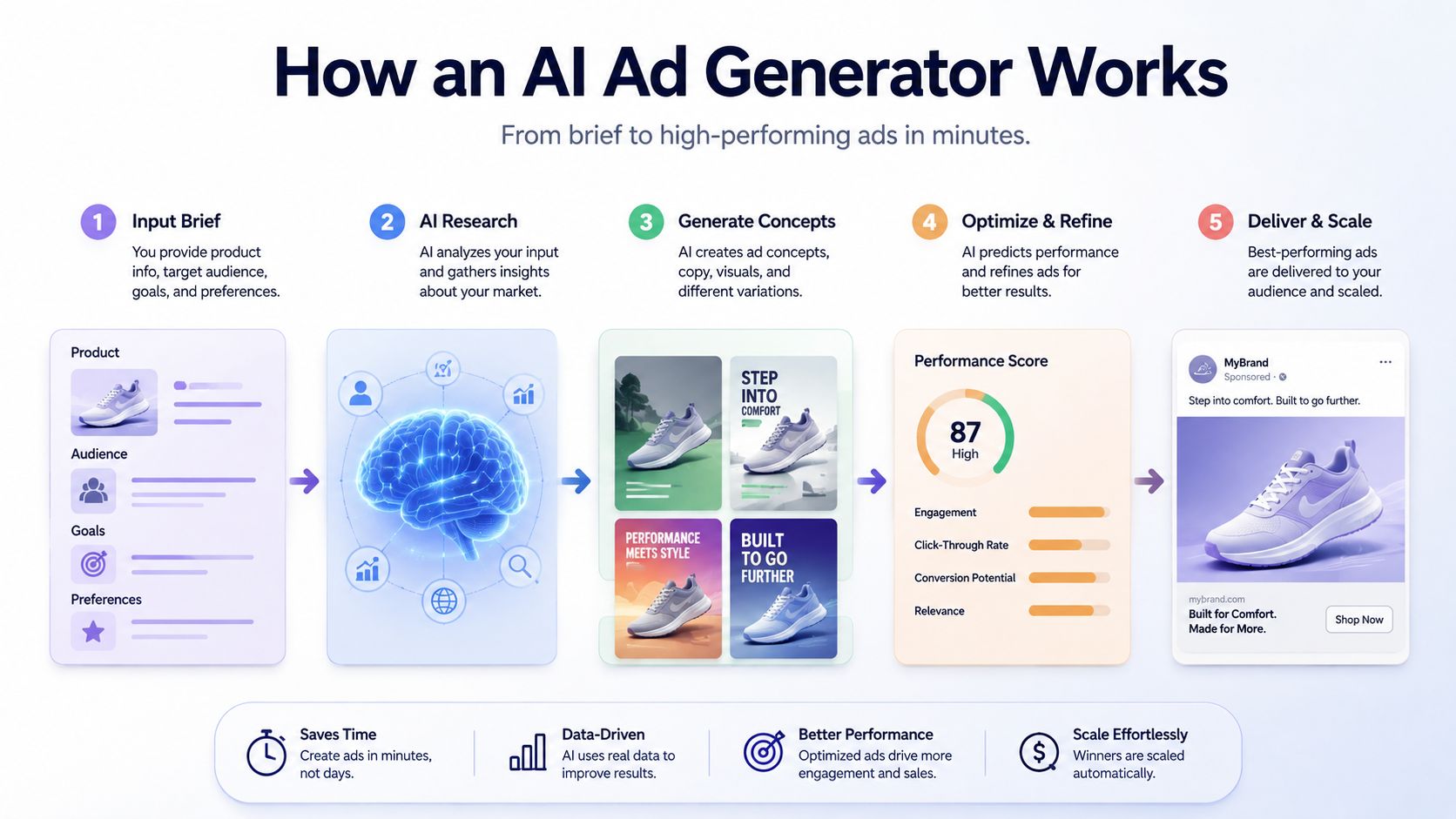
The inputs are usually simple. A product feed. A logo. A color palette. A short offer description. Sometimes a voice sample or a few approved phrases. The model layer then proposes copy, hooks, and visual combinations, while the template layer keeps layout, sizing, and placement rules intact. For teams that already work from a content library, this feels less like magic and more like a disciplined assembly line.
Marketers are already using GenAI for copywriting (34%), image generation (25%), and creative versioning (25%), which is a clue that versioning and adaptation are the immediate prize, not fully autonomous ad creation (eMarketer). That lines up with what paid media teams need, which is not a blank canvas, but a controlled way to produce many on-brand variants from one source.
A small e-commerce brand can feed one product page into the system and get platform-sized outputs for Meta, YouTube, and TikTok. A real estate team can keep the same listing message while swapping neighborhood highlights, CTA phrasing, and aspect ratios. The team still decides what’s approved. The model just does the repetitive work of turning one source into many usable shapes.
For teams that want a closer look at the mechanics of dynamic creative, the AI video generator page is a useful reference point for how input becomes output inside a templated workflow.
One Message Turned Into Every Format and Hook
A campaign falls apart fast when one strong idea has to move through too many hands. The strategist wants a clean angle, the designer needs platform-safe dimensions, and the media team wants hooks they can test without rebuilding the whole asset stack. An AI ad generator keeps those pieces tied to the same source, so the workflow is about versioning, not rework.
Before one brief becomes five versions
A manual workflow usually starts with a brief, then moves to layout changes, cutdowns, alternate openings, and another approval cycle when something small breaks on mobile. That means the team spends a lot of time fixing format problems before it ever gets to message testing.
A generated workflow starts with one message and branches into platform-ready outputs. The same source can become a feed ad, a story, an in-stream version, a value-led hook, a promo-led hook, and a direct-response CTA variant. For teams that also use one message turned into every format and hook, the point is the same, keep the core message intact while changing the wrapper around it. The goal is not to make every version identical. The goal is to produce enough clean options to see which one the market responds to.
| Aspect | Manual Production | AI Ad Generator |
|---|---|---|
| Time to first set of variants | Days | Much faster, because the layout and copy logic are reused |
| Angles tested | Usually a few | Many from the same source |
| Platform sizing | Rebuilt by hand | Sized from the same template system |
| Brand consistency | Depends on each handoff | Locked into the template and brand rules |
That matters because versioning is where campaigns either stay disciplined or drift. A 2025 NYU Stern/Emory study found fully AI-generated visual ads outperformed human expert-created ads on the Google Display Network, with a 19% relative CTR lift across 105,999 impressions (NYU Stern/Emory). The useful takeaway is narrower than the headline. A generator can create enough distinct variants to reveal what works before a hand-built process slows the test.
The same logic shows up outside paid media. A ministry team that wants to repurpose sermon content with AI can keep the main message, then adapt the opening, audience angle, and call to action for different channels. The workflow is similar. One source becomes several usable versions, with fewer manual edits between them.
The Real Value Is Testing Speed, Not Just Output Speed
The wrong way to use an AI ad generator is to celebrate volume and never inspect the learning loop. The right way is to use extra output to test more angles, faster, with a tighter read on what converts. That’s how one message becomes a data system instead of a one-off asset.
Two companies can sell the same SaaS offer and behave very differently. Company A still briefs each version as if it were a mini-campaign, so every new angle waits for design, edits, and approvals. Company B generates multiple creative versions from a single source, pushes them into test, and replaces losers without reopening the production queue.
What matters most is cadence. If your team can test more hooks, more CTAs, and more placements in the same window, the campaign learns faster than the competition.
There’s a catch, and it’s not small. The industry data shows 75% of agencies now use GenAI, yet nearly 80% say they use it on less than half of their work, mostly because of legal, data security, employee readiness, and business-model concerns, while only 30% of agencies, brands, and publishers have fully integrated AI across the media campaign lifecycle (AAAA). That gap explains why many teams generate output but never operationalize it. Volume without governance creates brand drift, approval chaos, and messy handoffs.
For teams that need a lightweight way to systemize repetitive creative work, 5 time-saving tips for better animated videos is a practical companion piece. The broader principle is the same. Build a repeatable workflow, then let the system do the repetitive versioning while humans keep control over message, risk, and standards.
AI Ad Generator Use Cases Across Industries
A dealership may start with one inventory feed and still need clean variations for local offers, trim levels, and regional incentives. An airline can do the same for routes, departure cities, and seasonal pushes. A nonprofit can adapt donor appeals by segment without reopening the whole production chain.

Ecommerce teams usually feel the pressure first. One product has to become a short-form ad, a carousel, a retargeting unit, and a seasonal promo, all while the offer stays consistent. HR and internal comms teams use the same workflow for recruiting and onboarding, where clarity matters more than production polish.
Insurance shows why governance matters. A team can generate policy explainers by audience, but every variant still needs approved language, legal review, and a clear rule for what can be changed. Real estate teams use the same approach to version listing creative by neighborhood, price point, and buyer profile. Education teams turn a course launch into student, parent, and alumni versions. Travel teams create route and season variants from one offer.
Agencies need a different kind of control. They may build client-specific variants at speed, but the test is whether approvals stay manageable across accounts. That is where chatbot-driven Webflow strategies point to a useful pattern, automated content logic can support conversion-focused work without forcing a full rebuild every time a message changes.
Consumer comfort still trails advertiser adoption, so the strongest use cases are narrow and easy to review. Analysts in the IAB data found 80% of advertisers were positive about using GenAI to create ads, compared with 48% of consumers. That gap matters in regulated markets and enterprise teams, where the workflow has to satisfy both performance goals and stakeholder review.
Choosing a Tool and Building Your Workflow
The tool question is less about shiny features and more about control. Look for template quality, brand-locking, data-feed connectivity, output formats for each placement, automation triggers, and a pricing model that fits a small team without forcing every test to become a budget conversation. If the system can’t keep your palette, logo spacing, and compliance text steady, it’s going to create more cleanup than value.
The workflow should be boring in the best way. Product feed, CRM, or spreadsheet goes in. Template comes next. A trigger, such as a new product, new offer, or campaign launch, starts generation. Then distribution sends the variants to the right channel or approval step. That’s the shape of a real system, not a clever prompt.
Practical rule: if the workflow can’t be explained to a media buyer and a compliance reviewer in one minute, it’s too fragile.
A platform can help when the problem is repeated versioning, not one-off storytelling. For teams that need to generate multiple ad versions from one core message without a separate production cycle for each, Wideo’s AI ad generator does that in a structured way through its AI ad generator, while templates and automation help keep output consistent. Pair that with Wideo templates and Wideo’s AI video generator, and you’ve got a cleaner path from source data to ready-to-run assets.
A practical implementation in a retail team might start with a product feed, map it to a locked template, fire generation when inventory changes, then send the finished outputs to paid social and a review queue. A SaaS team could do the same with feature launches or lifecycle milestones. If your team already manages campaigns through a broader video automation workflow, Wideo video automation is the kind of internal link that connects this use case to the rest of the production stack.
The Variations You Are Not Testing
The missing work is usually obvious once you audit it. One retail team I worked with had headline tests, but almost no variation across format, audience proof, or offer framing. The message was sound. The production plan was narrow.
Start by checking three gaps. Are you testing the same hook across different placements, or just resizing one asset? Are you covering proof points, objections, and calls to action, or only changing the headline? Are you approving variations fast enough to learn from them, or letting review slow the whole cycle?
A good AI ad generator should close those gaps by producing the variants your team would not make by hand every week.
The value is governance. If brand rules, template limits, and approval steps are clear, the team can test more angles without drifting off message. If they are vague, output grows while useful learning stays flat.
Related posts:
 Your Guide to AI Video Generator Technology
 A Guide to AI Video Creation for Beginners
 AI Avatars: The New Face of Business Communication
 AI Avatars: The Secret Weapon for Business Growth and Efficiency
 AI Technology: The New Creative and Strategic Core of Business
 12 Powerful AI Tools for Video Creators in 2025


