
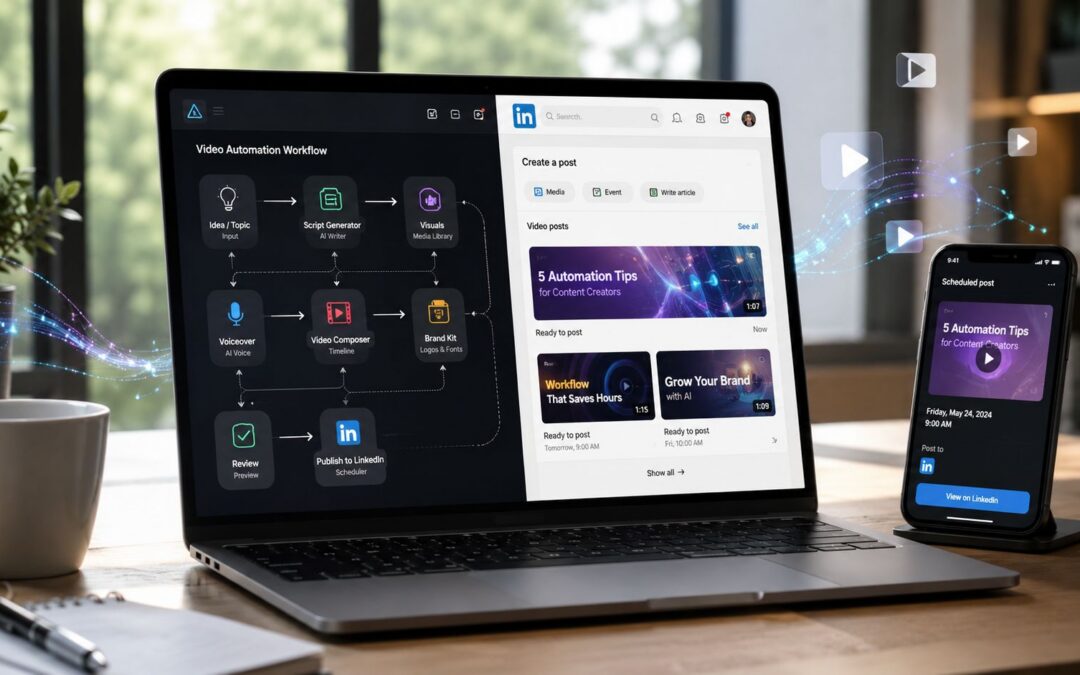
LinkedIn reported that video watch time rose 36% year over year in 2024, short-form creation grew at twice the rate of other post formats, and users were 20x more likely to share video content, which is why LinkedIn video automation now belongs in operations discussions, not just content meetings, according to Social Media Today’s coverage of LinkedIn’s reporting.
Most companies still treat visual content like a custom-built trade show booth. They assemble it for a campaign, use it once, and tear it down. The teams pulling ahead treat it more like a production line connected to CRM events, product updates, recruiting workflows, and internal reporting.
That shift changes who owns the system.
The End of One-Off Video Production

A marketing-led, one-off model usually creates polished campaign assets and then stalls. Sales asks for account-specific clips. Customer success needs onboarding explainers. HR wants recruiting and training content. Operations needs weekly stakeholder updates. The creative team becomes a ticket queue.
A programmed model starts somewhere else. It asks which business events should generate a recorded message, which data fields should shape it, and where the asset should be distributed. That’s a systems question, not a studio question.
Two companies can have the same brand, the same team size, and the same LinkedIn presence. One publishes occasional thought leadership clips and hopes they land. The other turns product releases into company page posts, turns webinar highlights into sales follow-up assets, turns new-hire milestones into recruiting content, and turns quarterly updates into internal communications. Same platform. Different operating model.
Practical rule: if a team creates the same type of LinkedIn asset more than once, it’s no longer a creative exception. It’s a workflow candidate.
This matters well beyond demand generation. A SaaS company can turn feature updates into sales enablement snippets for account executives. An insurance firm can distribute policy education as repeatable visual content for brokers and clients. A university can repurpose faculty talks into admissions outreach and alumni engagement. A real estate group can keep agents and prospects aligned with market updates that don’t require an editor every time.
Teams that need to think through high-volume creation patterns often benefit from seeing how others batch production. Framesurfer’s video creation guide is useful because it shows the operational mindset behind producing many assets in a compressed cycle. The broader business case is similar to what Wideo describes in why one video isn’t enough for your business.
Designing Your Automated Video Workflow

The cleanest way to design LinkedIn video automation is to map it backward from a business event. Don’t start with editing software. Start with the trigger, the data source, the audience, and the action you want after the post or message appears.
Build from triggers, not topics
A SaaS onboarding team might trigger a dynamic asset when a user status changes to “new customer” in the CRM. The output isn’t a generic welcome clip. It’s a context-aware onboarding message that references the product tier, assigned success manager, and next milestone. Distribution could happen on LinkedIn only for thought-leadership style companion content, while the direct customer message goes elsewhere.
A real estate firm works from a different event model. New listing, status change, price update, open house scheduling, or local market movement can all feed a repeatable template. The point isn’t to flood LinkedIn with machine-driven posts. The point is to create a controlled stream of relevant updates that match the agency’s operating rhythm.
An HR team can use the same architecture for recruiting and training. Offer accepted triggers a hiring-manager welcome asset. Policy change triggers an internal explainer. Manager certification completion triggers a follow-up recorded message for compliance training. Same pipeline shape. Different business function.
The strongest workflow usually has fewer creative choices than people expect and more data conditions than they expect.
Design the control stack
One practical benchmark for an end-to-end LinkedIn automation system is a stack with a database, RSS or topic ingestion, AI writing, optional AI image generation, and a final publishing gate, with brand-guideline prompts and structured frameworks used to keep tone consistent, as outlined in this automation architecture walkthrough.
That final publishing gate matters because LinkedIn content isn’t email. Email tolerates high segmentation and direct utility. LinkedIn posts also carry reputational weight. A publishing gate gives legal, brand, or department owners a checkpoint before anything goes live.
For teams comparing architecture options, Scalelist’s LinkedIn automation guide is a helpful reference because it frames automation choices around actual workflow constraints, not just features. If you want a platform-oriented example of connecting trigger tools into a creation flow, Wideo shows the basic pattern in its explanation of automating video creation with Zapier integration.
Why APIs beat loose middleware in mature systems
Zapier or Make is usually enough when a team is proving a narrow workflow. It’s fast, visible, and easy for non-developers to adjust. That’s useful for customer success pilots, recruiting experiments, and one department trying out a limited sequence.
An API-led build becomes the better choice when governance matters. Enterprise operations usually need stricter logging, approval controls, error handling, data masking, and fallback behavior. Finance, insurance, and large SaaS teams often care less about “can this publish” and more about “can this fail safely.”
Creating and Personalizing Dynamic Assets at Scale

The core production unit is the template.
A master template turns one audiovisual piece into many outputs by swapping fields such as customer name, product name, industry, agent photo, next step, location, or account owner. That’s how a single design becomes a one-to-one asset without sending an editor back into the timeline for every version.
Template logic by business function
In ecommerce, abandoned-cart reminders can pull product imagery, cart details, and promo language from commerce data. The LinkedIn use case isn’t direct cart recovery as much as B2B retail communication, partner enablement, or brand storytelling built from the same product feed.
In finance, portfolio commentary has to stay controlled. A template can handle the visual structure while approved data and commentary slots are filled by upstream systems. Compliance teams usually prefer this approach because it limits improvisation.
For customer onboarding, the logic is simple and powerful. Pull customer data from a CRM or spreadsheet, inject it into a welcome template, trigger creation when status changes, and route the finished recorded message to the right owner or channel. For teams that need to generate hundreds of onboarding assets from CRM data without manual editing, platforms like Wideo can support that template-and-data workflow.
Where personalization fails
Most failed personalization projects don’t fail on rendering. They fail on relevance.
If every output says “Hi Sarah” and nothing else reflects Sarah’s situation, the asset feels machine-written. A useful context-aware dynamic asset changes the message itself. A travel company might vary by destination and booking stage. An education provider might vary by program interest and application status. A media company might vary by subscriber tier and content history.
Use data to change the meaning, not just the greeting.
A short implementation pattern works like this. Pull account or contact data from a CRM, map those fields into a locked template, trigger creation when a stage changes, and send the finished asset to a distribution queue for review or direct delivery. That’s the practical bridge from database to visual output.
The Mechanics of Programmed Distribution on LinkedIn
Distribution is where many LinkedIn video automation projects become fragile.
The popular promise is simple: connect a tool, publish everywhere, and keep the pipeline moving. A key constraint is that LinkedIn distinguishes between acceptable publishing workflows and behavior that starts to look scripted, low quality, or abusive. That difference matters more now because LinkedIn has tightened enforcement against certain automated behaviors while making content more readable by AI models, with coverage also noting dynamic daily limits as low as 10 to 30 actions and closer scrutiny of low-quality automation in this report on LinkedIn automation changes.
Company pages and personal profiles are not the same system
Company page distribution is usually the safer place to build a structured publishing engine. It fits normal brand governance, gives teams clearer ownership, and avoids many of the behavioral risks attached to personal-profile activity.
Personal profiles are different because automation there often drifts into risky territory. Scheduled publishing may be one thing. Scripted commenting, volume-based outreach, and low-context engagement are another. LinkedIn increasingly appears to care about trust signals, which means a sloppy machine-driven profile workflow can damage reach or account health even if the content itself looks polished.
That’s why many enterprise teams keep the programmed layer on company pages and use personal profiles for human follow-through. The brand publishes the asset. The executive, recruiter, or salesperson adds the actual conversation.
Middleware versus direct integration
Middleware is a good fit when the workflow is linear. Trigger arrives, asset gets created, a draft enters approval, and the approved post gets queued. This setup works well for HR announcements, training content, and recurring company updates.
Direct integration makes sense when the workflow branches. You may need conditional logic by geography, separate queues for legal review, fallback states when rendering fails, and different handling for internal communication versus external distribution. That’s common in insurance, finance, and global enterprise teams.
A practical middle path is to keep orchestration outside LinkedIn and keep LinkedIn itself as the final delivery surface. The less your system imitates human behavior inside the platform, the safer it tends to be. For teams thinking through native posting formats and how LinkedIn treats uploaded assets, Wideo’s guide to uploading native videos to LinkedIn is a useful operational reference.
Measuring Performance and Driving Business Outcomes

A LinkedIn view doesn’t mean much by itself because the platform counts a view only after at least 2 seconds of watch time, and LinkedIn’s analytics expose view count, engagement rate, watch time, audience retention rate, and click-through rate, which makes testing and iteration possible at scale, as described in this breakdown of LinkedIn video analytics metrics.
That 2-second threshold changes how teams should evaluate creative. The first seconds are not decoration. They decide whether the asset registers measurable reach at all.
Tie metrics to the department that owns the workflow
Sales teams should care whether a dynamic asset helps an account executive start warmer conversations or get more responses after a meeting. Customer success should care whether onboarding content reduces confusion and improves milestone completion. Internal communications teams should care whether leadership updates hold attention long enough for employees to absorb the message.
A media team might watch retention curves for thought leadership clips. An HR group might compare engagement patterns across recruiting stories. A SaaS operations team might examine which hooks keep prospects watching long enough to click through to a product page or demo request.
A good metric is the one that changes the next decision.
If your reporting layer only shows volume, you’ll keep producing more volume. If it shows where viewers drop off, which CTAs get ignored, and which audience segments respond, the workflow starts behaving like a business system instead of a content calendar.
For leaders trying to connect communication metrics to actual operating decisions, this guide for smarter business decisions is a useful companion because it forces the KPI conversation beyond surface-level engagement.
Common Pitfalls and Compliance Guardrails
The worst assumption in LinkedIn video automation is that if a task can be machine-driven, it should be.
That mindset creates robotic outreach, duplicate messaging, broken approvals, and visible brand damage when source data is wrong. A fintech company with stale CRM fields can send the wrong market update. A real estate team with outdated listing data can publish an irrelevant asset. A customer success group can welcome the wrong stakeholder if account ownership hasn’t synced cleanly.
A practical workflow uses AI to draft the hook, body, and CTA, then routes the message through a campaign layer that sends by recipient time zone, and one tutorial recommends starting with a small pilot segment such as 10 targets before expanding, which is a sensible way to reduce risk in live campaigns, as shown in this LinkedIn outreach workflow tutorial.
Guardrails that keep the system useful
- Pilot before rollout: Start with a narrow audience and inspect every output manually before wider distribution.
- Separate drafting from publishing: Let intelligent systems prepare copy and asset variants, but keep a human approval gate for anything public.
- Protect account health: Avoid scripted engagement patterns that imitate human activity on personal profiles.
- Validate source data: Check CRM, spreadsheet, or product-feed inputs before rendering begins.
- Respect privacy and retention rules: If customer or employee data enters the workflow, governance has to be part of the design, not an afterthought. Teams handling personal data should review the platform’s relevant documentation, including Wideo’s privacy policy, when evaluating tools in the stack.
Where in your organization could one repeatable visual content workflow replace a dozen manual handoffs?
If your team needs a practical way to connect business data, templates, and distribution into repeatable video workflows, Wideo is one option to evaluate for that pipeline. The useful test isn’t whether it can make a nice clip. It’s whether it can fit your process from data source to template to trigger to delivery without turning LinkedIn into a spam machine. Video stops being a marketing asset when the business starts treating it like infrastructure.
Related posts:
 Automated video presentations for tech product launches
 Automated custom thank-you videos for non-profit donors
 Automating user-generated content for e-commerce brands
 Patient safety education through automated video content
 Virtual tour videos for hospitality automation
 Video Marketing for Law Firms Guide


